
Changing the email provider for a domain means leaving the domain registered where it is and rewriting the DNS records that route and authenticate mail, so that messages flow to and from a different mail host. The domain does not move. Your website, if you have one, does not move. Only four kinds of record change: MX for inbound routing, SPF for sending authorisation, DKIM for signatures and, usually, nothing at all for DMARC.
This is deliberately separate from a domain transfer. A transfer changes the registrar and is bound by ICANN's 60-day lock and a five-day approval window. A provider switch is a DNS edit that takes effect within the record's TTL, often an hour, and can be reversed just as fast. People conflate the two and end up moving a domain they only needed to re-point.
MailShrine Domains runs its own Anycast DNS with a full record editor, and the mail records it writes at registration are ordinary records you can replace. The two included Business Email mailboxes stop receiving once MX points elsewhere, which is expected; the domain, privacy, lock and renewals are unaffected. If you later want to come back, you restore the records and the mailboxes receive again.
Real-life example: Chidi's property firm
Chidi Nwosu runs Nwosu Realty in Lekki, Lagos, with eight agents. The firm registered nwosurealty.com on MailShrine and used the two included mailboxes for a year. The company has now standardised on Microsoft 365 because its CRM integrates with Outlook and Teams, and the IT contractor has told Chidi to "move the domain to Microsoft". Chidi suspects that is not quite right, since Microsoft 365 does not sell domains, and wants to switch mail without any agent losing a message or any client getting a bounce.
Chidi's goals this week:
- Understand which records change and which must not.
- Switch mail to Microsoft 365 with no bounced client messages during the change.
- Keep the domain, WHOIS privacy and renewals exactly where they are.
What changes and what does not
| Item | Changes? | Detail |
|---|---|---|
| Registrar | No | The domain stays on MailShrine; nothing to transfer |
| Nameservers | No | Keep MailShrine DNS and edit records in it |
| MX record | Yes | Replace with the new provider's hostname and priority |
| SPF record | Yes | Replace the MailShrine include with the new provider's, keep a single record |
| DKIM records | Yes | Publish the new provider's selector(s); remove MailShrine's once cut over |
| DMARC record | Usually no | Policy and reporting address stay; alignment comes from the new DKIM |
| Verification TXT | Yes, add | Most providers require a one-time TXT to prove you control the domain |
| Autodiscover / SRV | Sometimes | Microsoft 365 wants an autodiscover CNAME; Workspace does not |
| Website A/CNAME records | No | Mail and web records are independent |
The common thread: every record that mentions mail changes; everything else stays. Chidi's IT contractor was describing a DNS edit, not a transfer.
Records three common providers ask for
| Provider | MX | SPF include | DKIM | Extra |
|---|---|---|---|---|
| Microsoft 365 | <tenant>.mail.protection.outlook.com, priority 0 | include:spf.protection.outlook.com | Two CNAMEs, selector1._domainkey and selector2._domainkey | autodiscover CNAME to autodiscover.outlook.com |
| Google Workspace | smtp.google.com, priority 1 | include:_spf.google.com | One TXT at google._domainkey (2048-bit) | Verification TXT at the root |
| Zoho Mail | mx.zoho.com 10, mx2.zoho.com 20, mx3.zoho.com 50 | include:zohomail.com | TXT at a selector you choose, e.g. zmail._domainkey | Verification TXT or CNAME |
Always copy the values from your own provider's admin console, which shows tenant-specific hostnames and keys. The table shows the shape, not your values.
What you need before you start
| You need | Why |
|---|---|
| The new provider's account with your domain added | Verification and record values come from there |
| Mailboxes created at the new provider for every address | Mail routes the moment MX changes; a missing user means bounces |
| A list of every current address, including aliases | Anything not recreated stops receiving |
| An export or IMAP migration plan for existing mail | The old mailboxes keep their contents, but users will want them in the new place |
| The current MX TTL, lowered to 300 a day ahead | Makes the switch, and any rollback, fast |
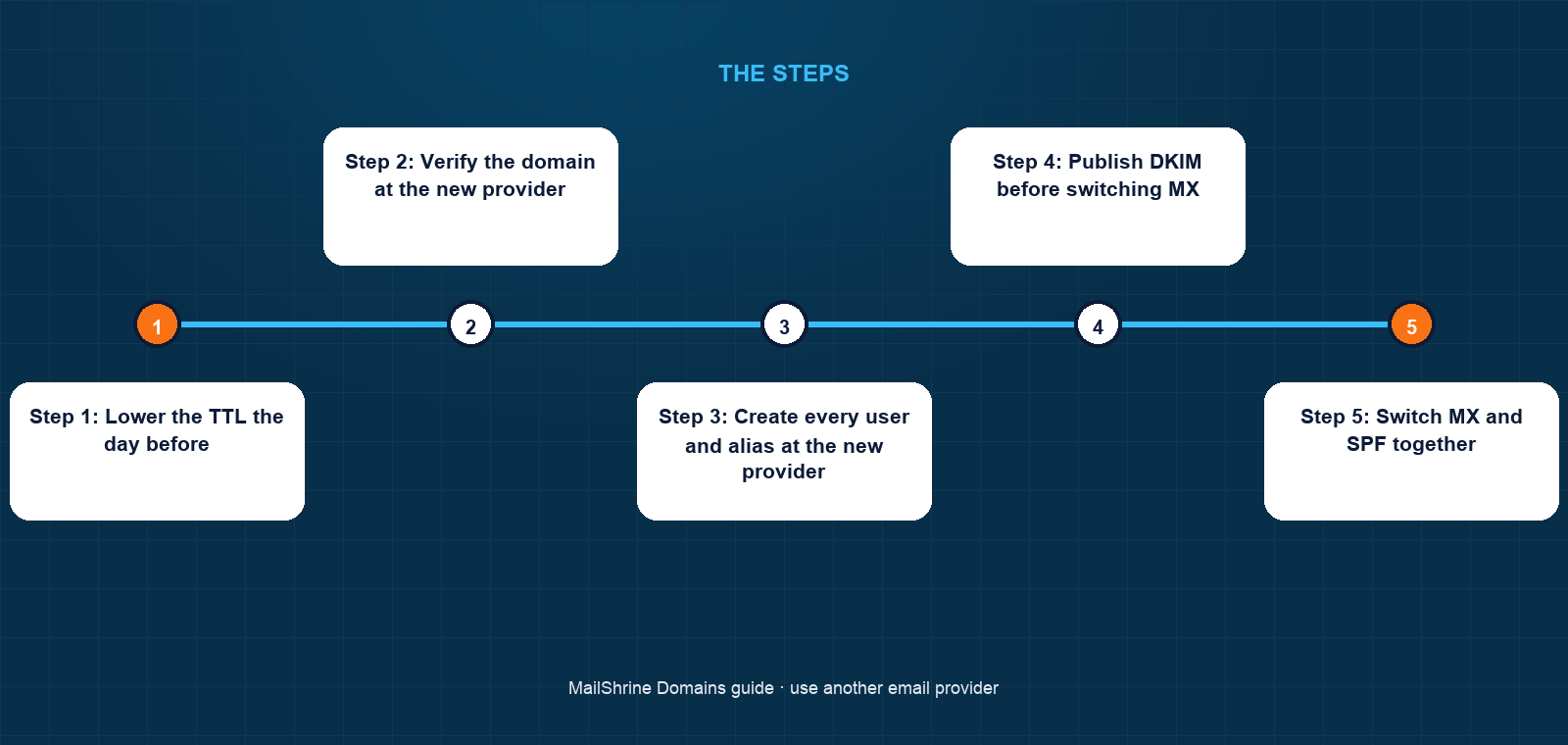
Step 1: Lower the TTL the day before
Chidi opens the MX record in the MailShrine DNS editor and changes its TTL from 3600 to 300 seconds. He does nothing else for 24 hours, so every resolver that cached the old hour-long answer has expired it.
Step 2: Verify the domain at the new provider
Microsoft 365 gives him a TXT record MS=msXXXXXXXX to add at the root. He adds it, waits a few minutes and clicks Verify. The domain is now known to Microsoft, but no mail has moved.
Step 3: Create every user and alias at the new provider
Eight agent mailboxes plus info@, lettings@ and sales@ as shared mailboxes or aliases. He checks each against the list from the MailShrine dashboard. This is the step people skip, and it is where bounces come from.
Step 4: Publish DKIM before switching MX
He adds both selector1 and selector2 CNAMEs, then enables DKIM signing in the Microsoft admin centre. Outbound mail from Microsoft will be signed from the first message.
Step 5: Switch MX and SPF together
He replaces the MX record with Microsoft's and edits the single SPF record to v=spf1 include:spf.protection.outlook.com -all. Within five minutes, because of the lowered TTL, inbound mail arrives in Microsoft 365. The DMARC record stays untouched; alignment now comes from Microsoft's DKIM signature.
Step 6: Add autodiscover, migrate, clean up
He adds the autodiscover CNAME so Outlook configures itself. The IT contractor runs an IMAP migration from the old MailShrine mailboxes into the new ones. After a week with no stragglers, he removes the old MailShrine DKIM selector and raises the MX TTL back to 3600.
Chidi's checklist
- Lowered the MX TTL to 300 a day beforeCompleted
- Added Microsoft's verification TXT and verifiedCompleted
- Created all eight users and three shared addresses in Microsoft 365Completed
- Published both DKIM CNAMEs and enabled signingCompleted
- Switched MX and SPF in one editNot completed
- Added the autodiscover CNAMENot completed
- Migrated old mail over IMAP, removed the old DKIM selector, restored TTLNot completed
Common mistakes
Transferring the domain when only mail needed to move. A transfer takes up to five days, is blocked for 60 days after registration or a previous transfer, and changes nothing about mail routing. If the goal is a new mail host, edit DNS.
Switching MX before the users exist. Every message to an address the new provider has not heard of is rejected with "recipient not found". Senders do not always retry.
Two SPF records. Adding the new provider's v=spf1 line alongside the old one causes a permanent SPF error at every receiver. Edit the existing record.
Deleting DMARC "because it was MailShrine's". The DMARC record is provider-neutral. Removing it drops your protection against forgery for no reason.
Forgetting the aliases. info@ and sales@ are often aliases rather than mailboxes and do not appear in a user list. Recreate them or the website's contact address goes dark.
Check your work
Run dig MX yourdomain +short and confirm only the new provider's hostnames appear. Run dig TXT yourdomain +short and confirm exactly one SPF record with the new include. Send from an outside account to the main address and to each alias; all should arrive at the new provider. Send outbound from the new provider to Gmail and open "Show original": SPF pass, DKIM pass with the new selector, DMARC pass. In the MailShrine dashboard, confirm the domain still shows Active with privacy and lock on, and that the renewal date is unchanged.
FAQ
Do I lose the two included mailboxes if I switch providers?
They stop receiving once MX points elsewhere, but they remain on the account. Export anything you need first. If you later restore the MailShrine MX and SPF records, they receive again.
Do I need to transfer the domain to Microsoft or Google?
No, and you cannot: neither sells domain registration directly. Both expect the domain to live at a registrar and ask you to add records there.
Can I run two providers at once during the switch?
MX can only route to one provider at a time; there is no split delivery. The safe pattern is to create users at the new provider, switch MX, then migrate old mail. Some teams keep the old mailboxes readable for a month as an archive.
Will my website go down?
No. Website records (A, AAAA, CNAME for www) are independent of mail records. Only touch the records in the table above.
How long does the change take to be live everywhere?
Up to the old MX TTL plus resolver lag. With the TTL lowered to 300 a day ahead, most of the internet sees the new MX within five to ten minutes. Without lowering it first, allow an hour or more.
Next steps
- MX Records Explained — the field-by-field meaning of the record you are replacing.
- SPF, DKIM and DMARC Explained — why DMARC stays while SPF and DKIM change.
- Google Workspace vs MailShrine Email — deciding whether to switch in the first place.
Citations & References
- Reference: Microsoft 365: Add DNS records to connect your domain
- Reference: Google Workspace: Set up MX records
- Reference: ICANN: Transfer Policy
- Reference: RFC 7208: Sender Policy Framework
Written by Elena V., migrations editor. Elena moves mail between providers for a living and has never once needed to transfer the domain to do it.