Business Email prices in USD and Naira
- Free: $0 / ₦0 /mo
- Solo: $2 / ₦3,200 /mo
- Team: $5 / ₦8,000 /mo
- Business: $12 / ₦19,200 /mo

MailShrine
Business Email
you@yourcompany.com
Team inboxes that carry your name — on the domain you already own.
Your branded inbox
Workspace suite2 mailboxes + 2 aliases freeBusiness Email
you@yourcompany.com — done right. Professional inboxes on your domain for the whole team — trusted in every reply, not just every campaign. 2 professional mailboxes — free forever. Calendar and Drive included. 2 aliases. No card.
Your address on stage
One domain. Many mailboxes. Look like a real company in every reply.
Team mailboxes
- FOActive
founder@yourcompany.com
Owner
- SAActive
sales@yourcompany.com
Team
- SUActive
support@yourcompany.com
Team
- HEReady
hello@yourcompany.com
Shared

01
Custom domain
Send and receive as you@yourcompany.com — not a free Gmail lookalike.
02
Team access invites
Share a mailbox with colleagues via invite link — no password hand-offs.
03
Suite around the inbox
Mail, Address book, Calendar, and Drive on Free. Tasks and Meetings on Solo. Branding and shared mailboxes on Team.
MailShrine Webmail
All about MailShrine Webmail
Every Business Email mailbox opens in MailShrine Webmail — a full browser inbox for your domain. Here is everything it can do today.
Core mail — reading & organization
System folders
Inbox, Sent, Drafts, Junk, and Trash — synced over JMAP.
Server search
Find messages across the mailbox with server-backed search.
Threaded conversations
Read full threads with clear participant meta (who replied, how many).
Star, flag & important
Mark what matters — with your preferred star color.
Read, archive, move, delete
Everyday triage without leaving the inbox.
Labels
Custom labels in the sidebar to organize beyond folders.
Filter rules
Gmail-style filters to auto-label and organize incoming mail.
Quoted & trimmed UI
Collapsible quote blocks so long replies stay readable.
Also included: draft badges on threads, scheduled-send badges, message pop-out, pagination with RTL-aware language support, and keyboard-friendly chrome throughout.
Compose, reply & forward
One shared compose card powers new mail, replies, forwards, and templates — so the experience never fragments.
- ✓Floating compose card that stays above Settings and other screens
- ✓New message, Reply, Reply all, and Forward on one shared compose card
- ✓Minimize to an orange dock (“New message · Draft”) and expand again
- ✓Close (✕) keeps the draft — it does not discard your work
- ✓Pop-out / pop-in compose in a separate window with sync
- ✓To / Cc / Bcc recipient chips — Enter, Tab, comma, paste lists; × to remove
- ✓Hide or show recipients; preference survives minimize
- ✓Rich-text editor: bold, italic, lists, color, quote, and more
- ✓Plain-text mode from the compose menu
- ✓Attachments via JMAP blob upload with attachment chips
- ✓Inline images in the message body
- ✓Links, emoji, and signature insert from the toolbar
- ✓Email templates — create/edit in Settings; insert from compose
- ✓Template editor reuses the same compose-quality editor
- ✓Schedule send with date/time and an undo window
- ✓Undo send — configurable 5 / 10 / 20 / 30 seconds
- ✓Auto-save drafts with a “Draft saved” indicator
- ✓Discard draft removes server and local draft
- ✓Default font, size, and color from General settings
- ✓Reply & follow-up nudges on older threads
Settings & personalization
- ✓Multi-language UI
- ✓Undo Send duration (5–30 seconds)
- ✓Default text style for new mail
- ✓Avatar upload and display
- ✓Vacation / out-of-office responder
- ✓Multiple signatures — new vs reply defaults
- ✓Inbox layouts: Default, Important first, Unread, Starred, Priority, Multiple Inboxes
- ✓Density: Default, Comfortable, Compact
- ✓Full theme pack: Light, Sky, Warm, Forest, Slate, Rose, Night, Aurora, and more
- ✓Customizable logo, color & theme (Team+)
- ✓Star color: gold, orange, blue, green, red
- ✓Accounts & imports — Gmail, Yahoo, Microsoft migration (Team+)
- ✓Contact import (CSV / vCard) with undo last import (Solo+)
- ✓Team access invites — share a mailbox without sharing the password (Team+)
- ✓Mailbox event log for shared inboxes (Team+)
- ✓Developer settings — JMAP / IMAP / SMTP cheat-sheet (Solo+)
- ✓Report a bug — opens a ticket in Business Email admin Support
Suite apps (9‑dot launcher)
Full production webmail path.
Address book
LiveContacts table, add, import, and undo import.
Calendar
LiveSchedule, reminders, and guest RSVP — on every plan, including Free.
Tasks
LiveList, board, and calendar beside the inbox — Solo and above.
Drive
LiveDocs, Sheets, Slides, PDF, ZIP — on every plan; mail and Drive share one GB pot.
Meeting
LiveMeet now + lobby — Solo and above. Company extras (screen share, polls, breakouts) on Business.
Why MailShrine Webmail stands out
- →True business mailbox on your domain — not @gmail.com
- →Team access invites — colleagues share a mailbox without the password
- →Floating compose that doesn’t trap you while you work in Settings
- →One compose card for new, reply, forward, and templates
- →Recipient chips with paste-many and per-address remove
- →Templates edited in a full compose-quality editor
- →Schedule send and undo send built in
- →Labels and filter rules without needing Google Workspace
- →Vacation, multi-signature, themes, and inbox layouts
- →Customizable logo, color & theme for branded teams
- →Contact import with undo
- →In-product Report a bug → admin Support tickets
- →JMAP-first webmail with IMAP/SMTP values for desktop clients
- →Suite launcher: Mail, Address book, Calendar, Tasks, Drive & Meeting
Suite · Tasks
Inbox + guestYou assign from the inbox. They work from one link.
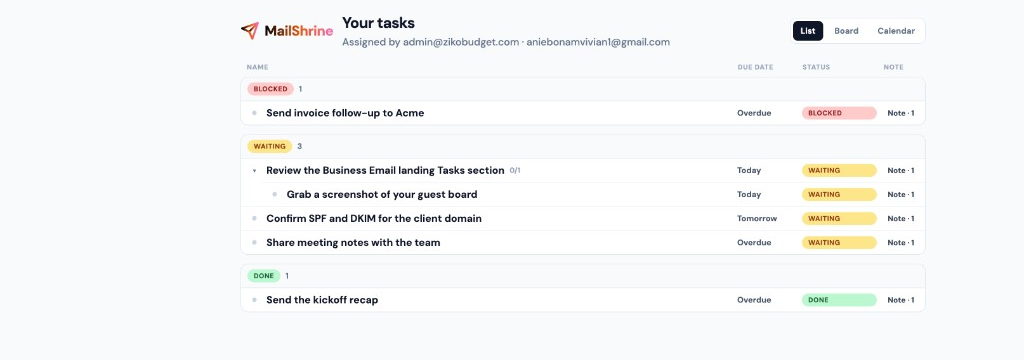
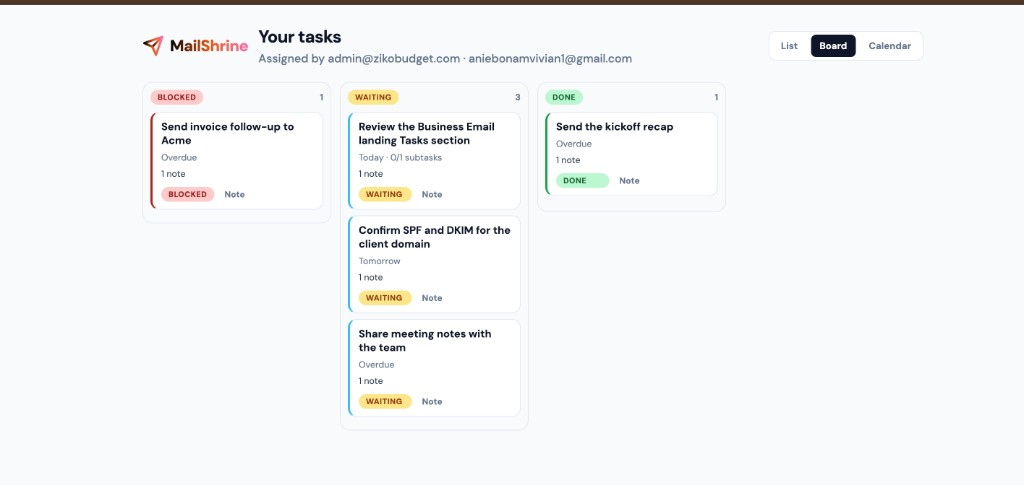
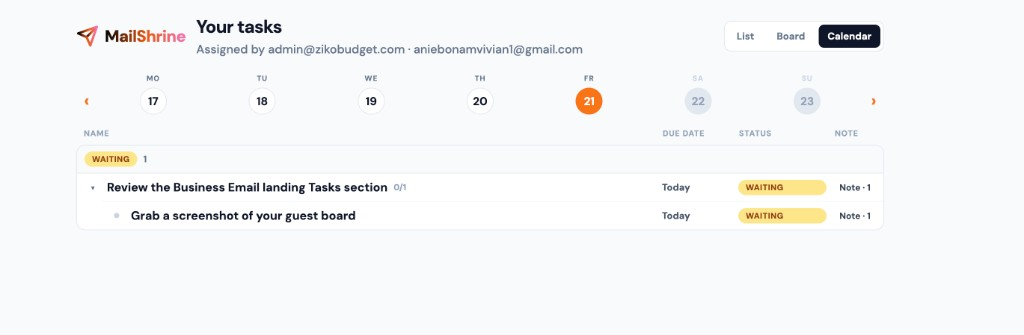
Create and nest work beside your mail. Your teammate opens mailshrine.com/webmail — no account. List, board, calendar, and a nested notes thread. Replies sync back to you. Tasks is on Solo and above.
Assigner view
Your mailbox — assign, nest, and read the thread as it comes back.
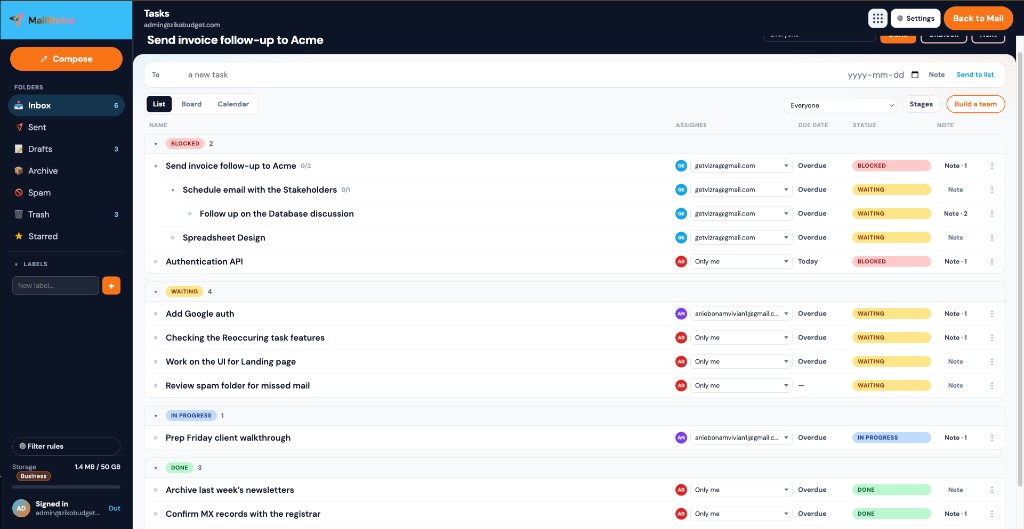
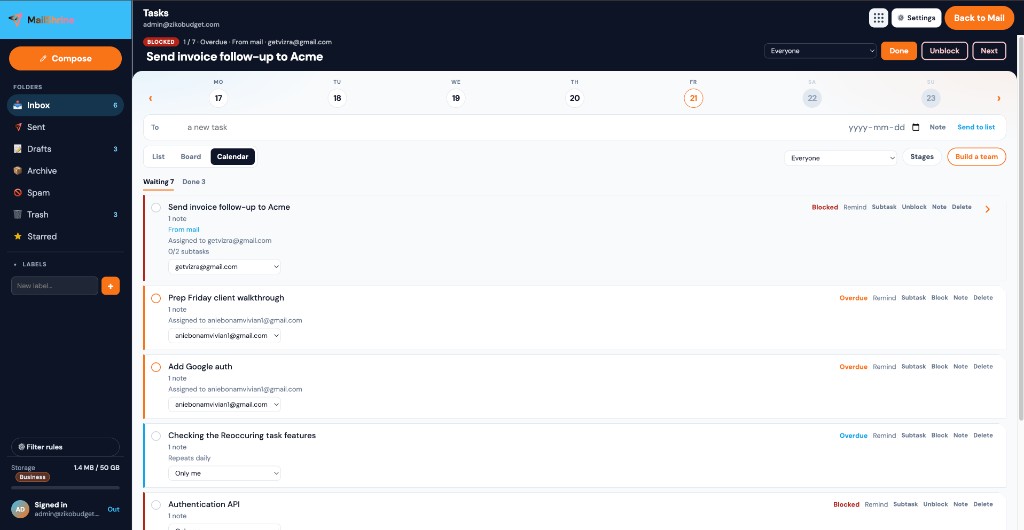
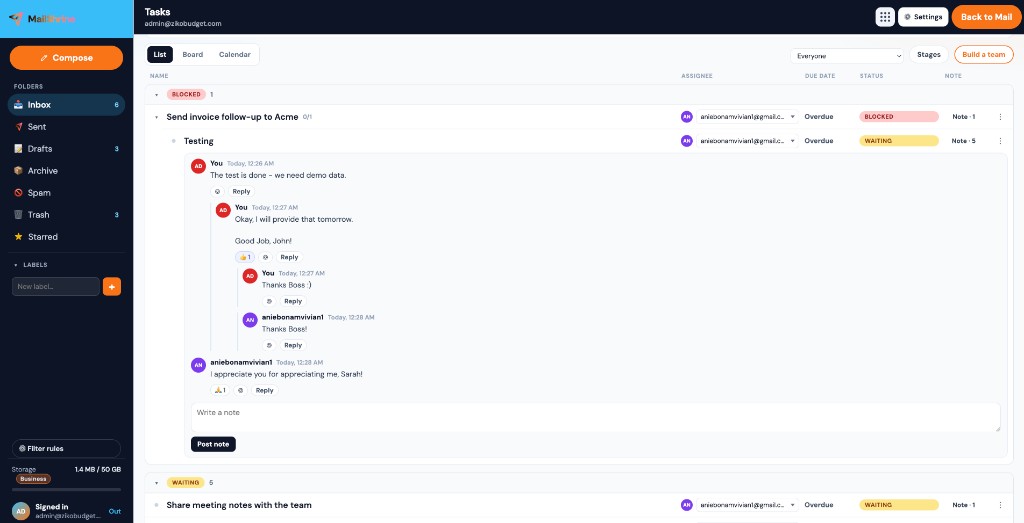
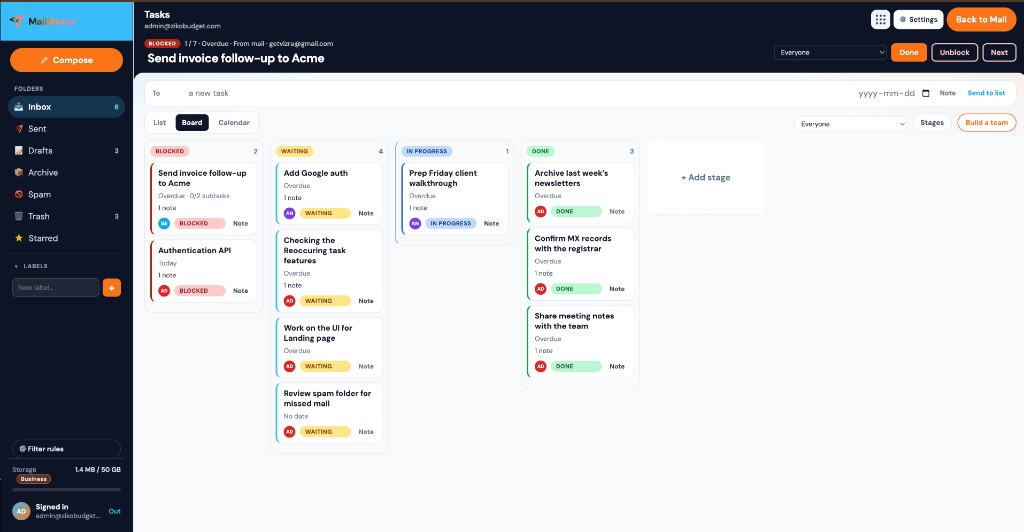
Your stages, your lanes. Add a stage when the workflow needs another column.
Assignee view
Same work, opened from the email — no login, on MailShrine.
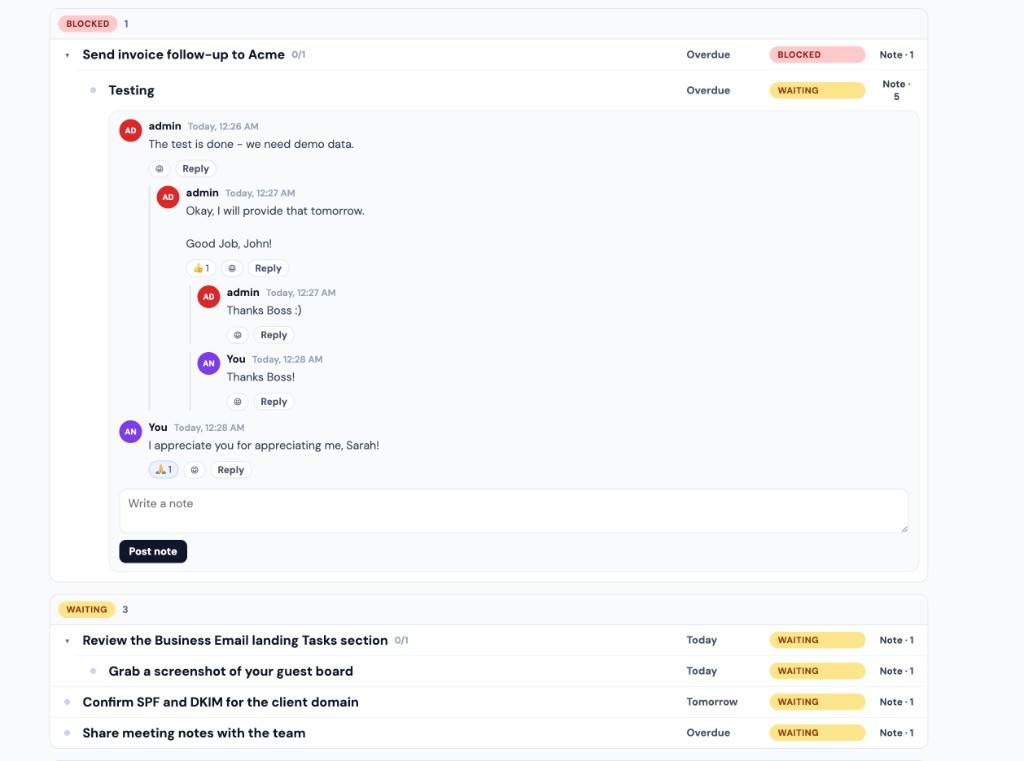
Notes nest like a thread. Replies stay on the task — no login required.
01
List, Board, Calendar
Switch views without leaving the inbox. Same tasks, same team — laid out the way you work.
02
Nested work
Break a job into subtasks, then nest those too. Assignees, due dates, and stages stay aligned down the tree.
03
Your stages
Blocked, Waiting, Done — plus stages you name yourself (In progress, In development, Review).
04
Assign by email
Pick a teammate. They get a mail with one guest link — no login. Mark done, block, or add a note. It syncs back.
05
Notes that behave like a thread
Each note has who wrote it, date and time, emoji reactions, and nested replies.
06
Reminders that actually fire
You get a ping in webmail. The assignee gets a reminder email with the same guest link.
Suite · Calendar
Inbox + guest RSVPYou schedule from the inbox. They RSVP from one link.
MailShrine Calendar sits next to mail — week, work week, day, and agenda — with Find a time, Meet now, rooms, and color-coded calendars. Guests open mailshrine.com/webmail for Yes / Maybe / No, Join video, and stop reminders. No second account. Calendar is on every plan, including Free.
Organizer view
Your mailbox — block the week, invite guests, and attach a video link.
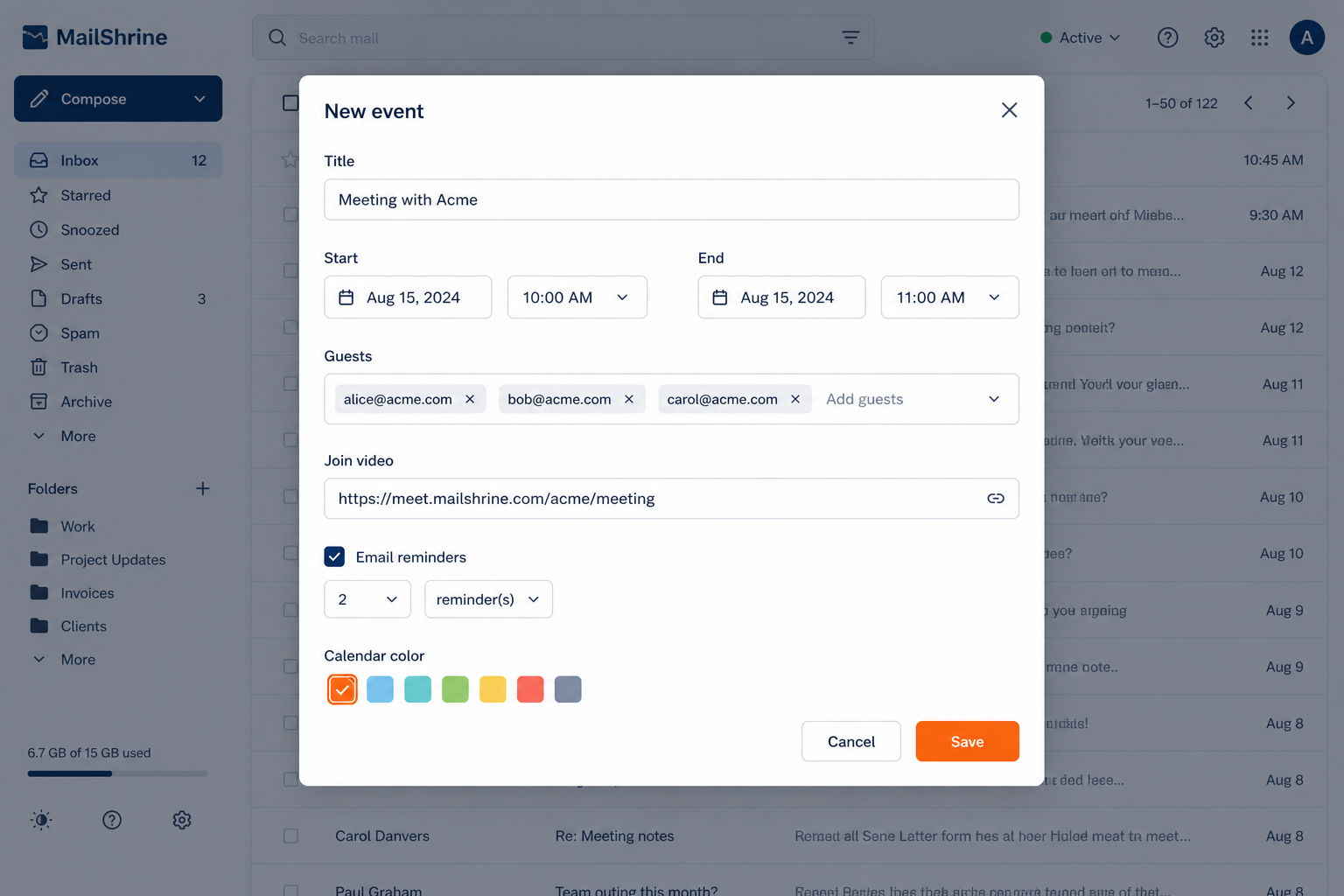
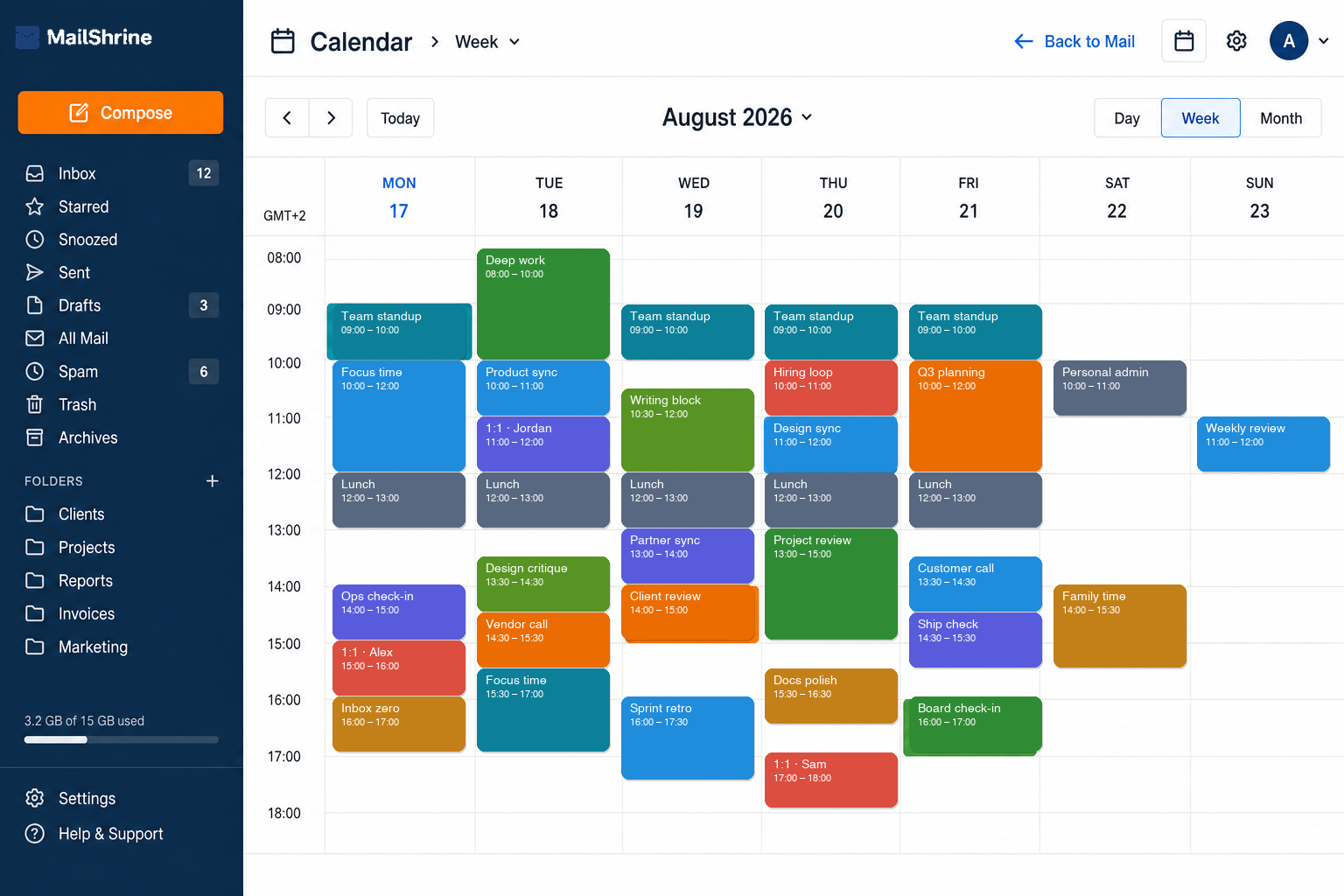
Your week next to mail — standups, 1:1s, focus time, and reviews in one grid.
Guest view
Same meeting, opened from the invite — no login, on MailShrine.
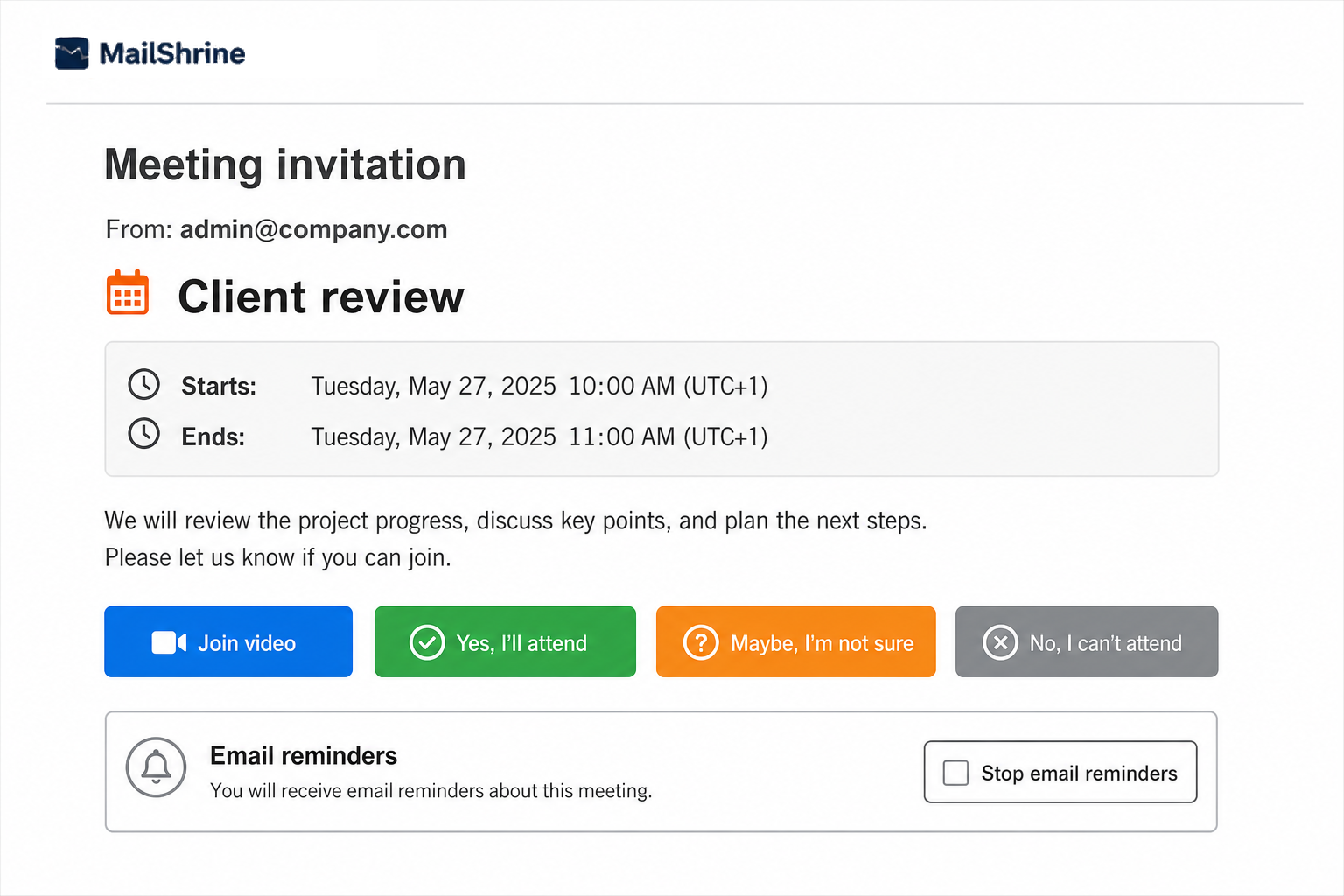
They open the invite on mailshrine.com/webmail — RSVP and mute reminders, no account.
01
Beside the inbox — not bolted on
Open Calendar from the suite. Same mailbox, same theme, same Back to Mail. Scheduling stays where work already lives.
02
Guests RSVP without an account
Yes / Maybe / No from one invite link. They never need a MailShrine mailbox — just the page.
03
Join video when you add a link
Drop in a meet URL or start Meet now. Join video shows on the event and the guest page.
04
Find a time, then book the room
Scan free slots across calendars, pick a room or equipment, and paint the event with a color that sticks.
05
Reminders guests can stop
Up to five email reminders before it starts. Guests mute further pings from the invite — no chase emails.
06
Share, sync, and stand out
Busy / read / write shares, CalDAV for Apple & desktop clients, repeats, rich notes, and an agenda that travels with the team.
Suite · Drive
Drive · Docs · Sheets · Slides · PDFFiles that live with your inbox
Drive opens from the same suite launcher as Mail — Docs, Sheets, Slides, and PDF with real Office files, share links on mailshrine.com, and one storage pool with the mailbox. On every plan, including Free.
Office studio
Tap an app — the same Drive, five ways to work. Every editor keeps Back to Drive and autosave.
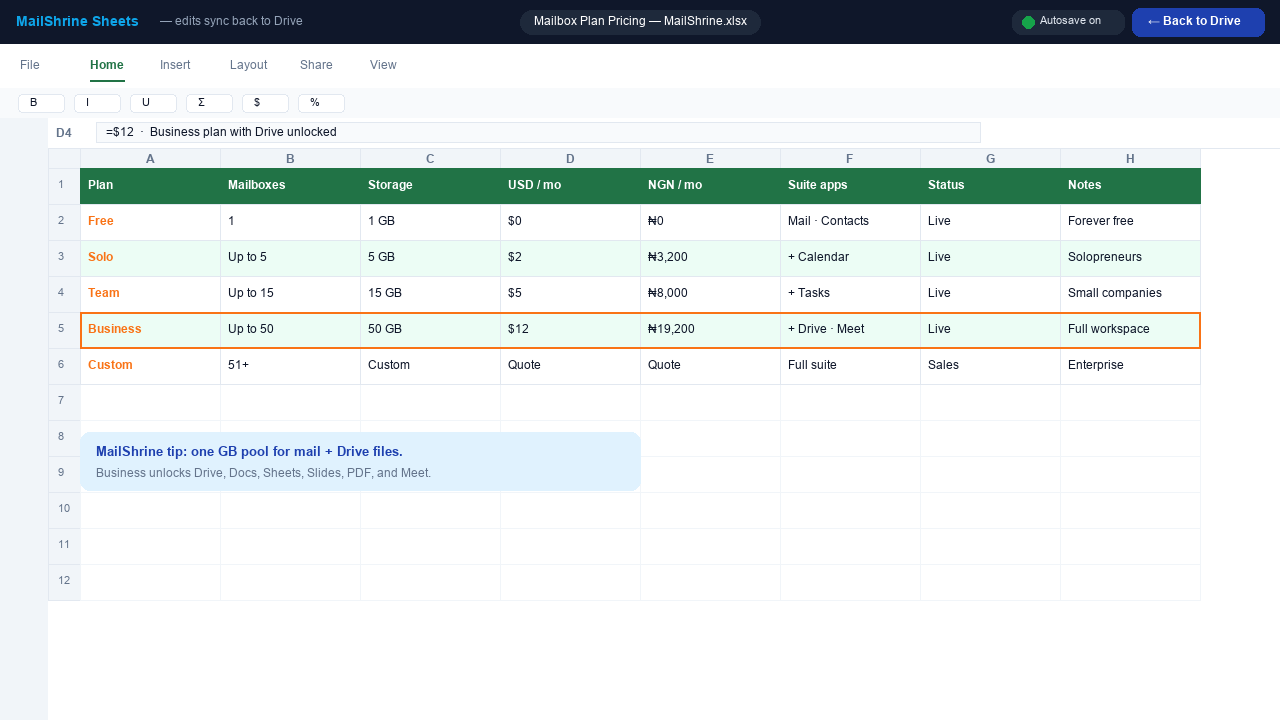
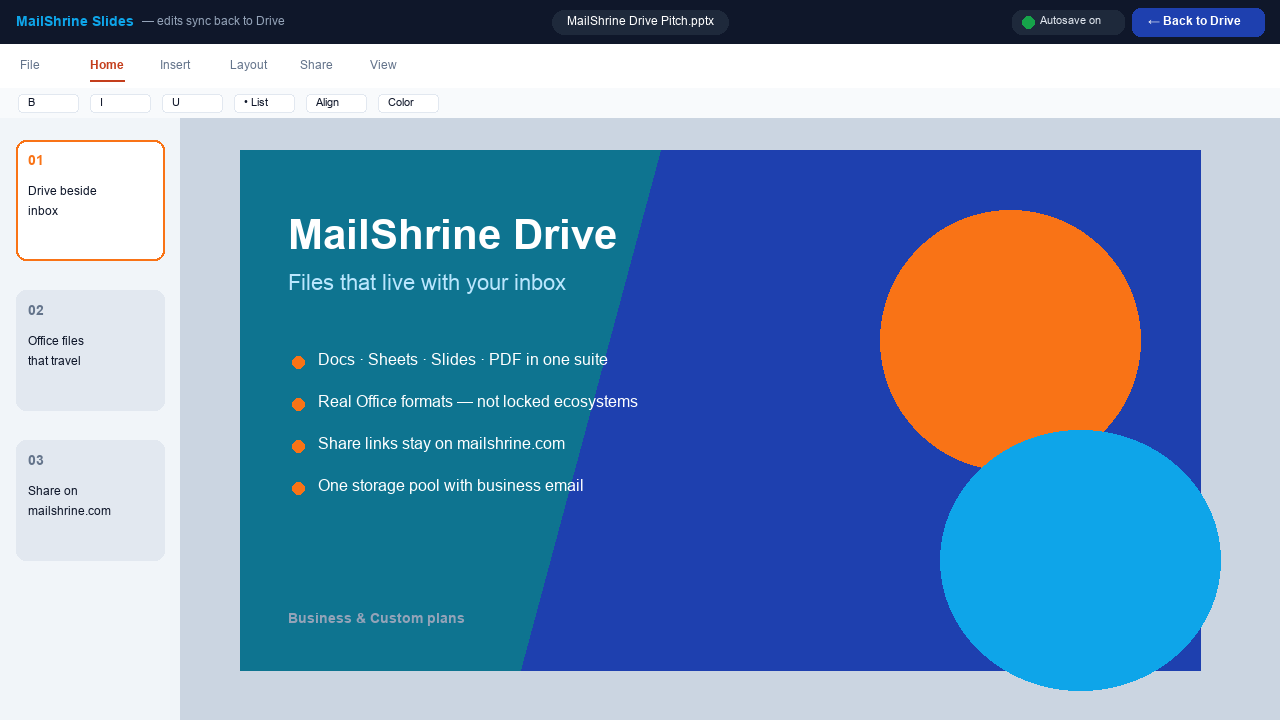
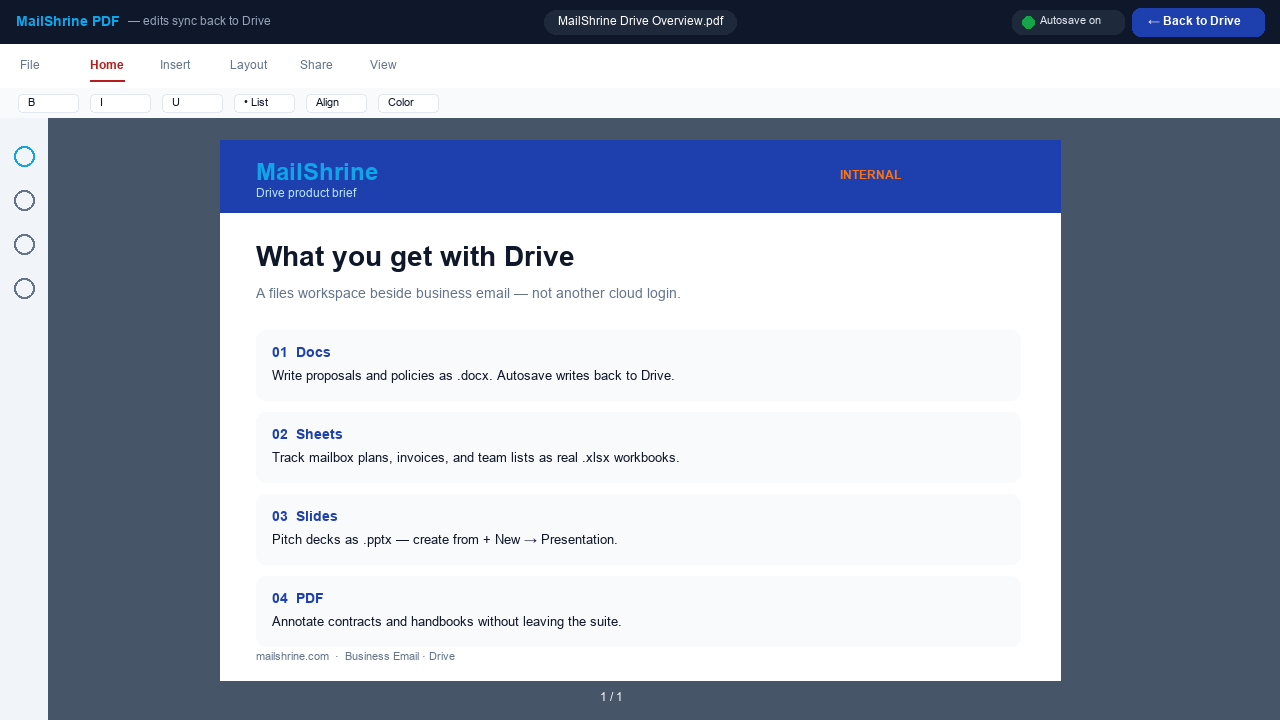
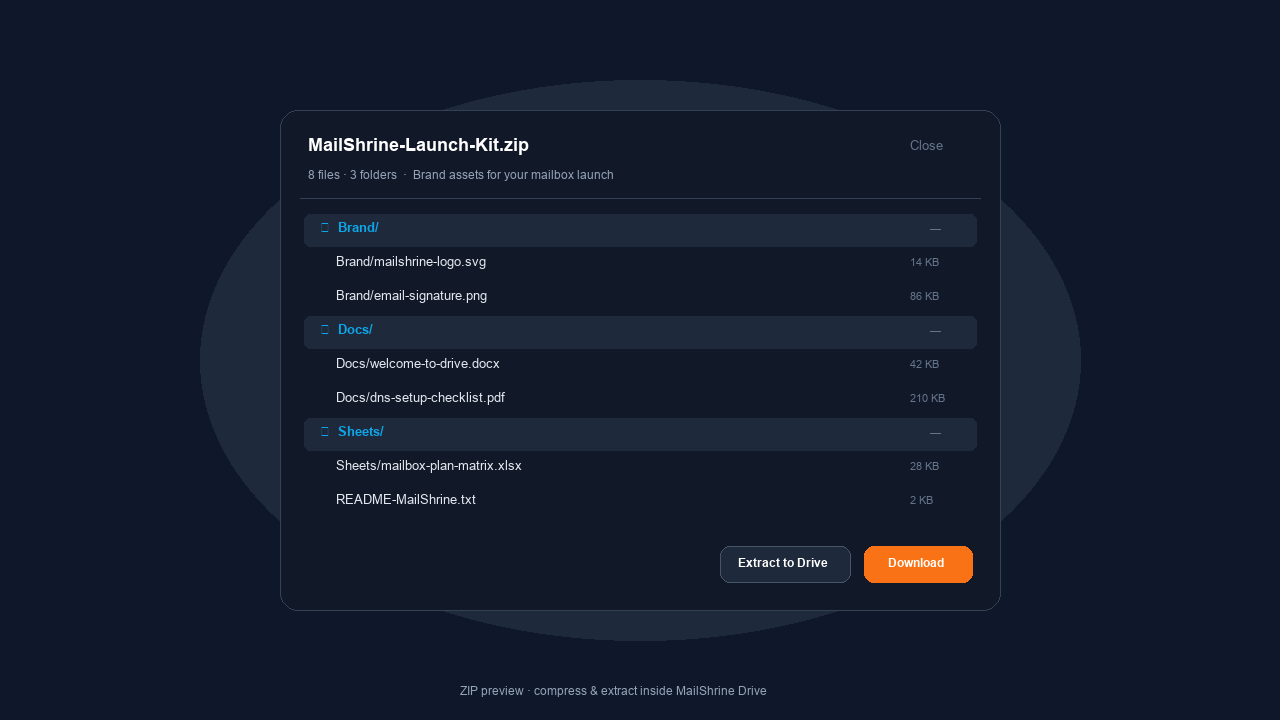
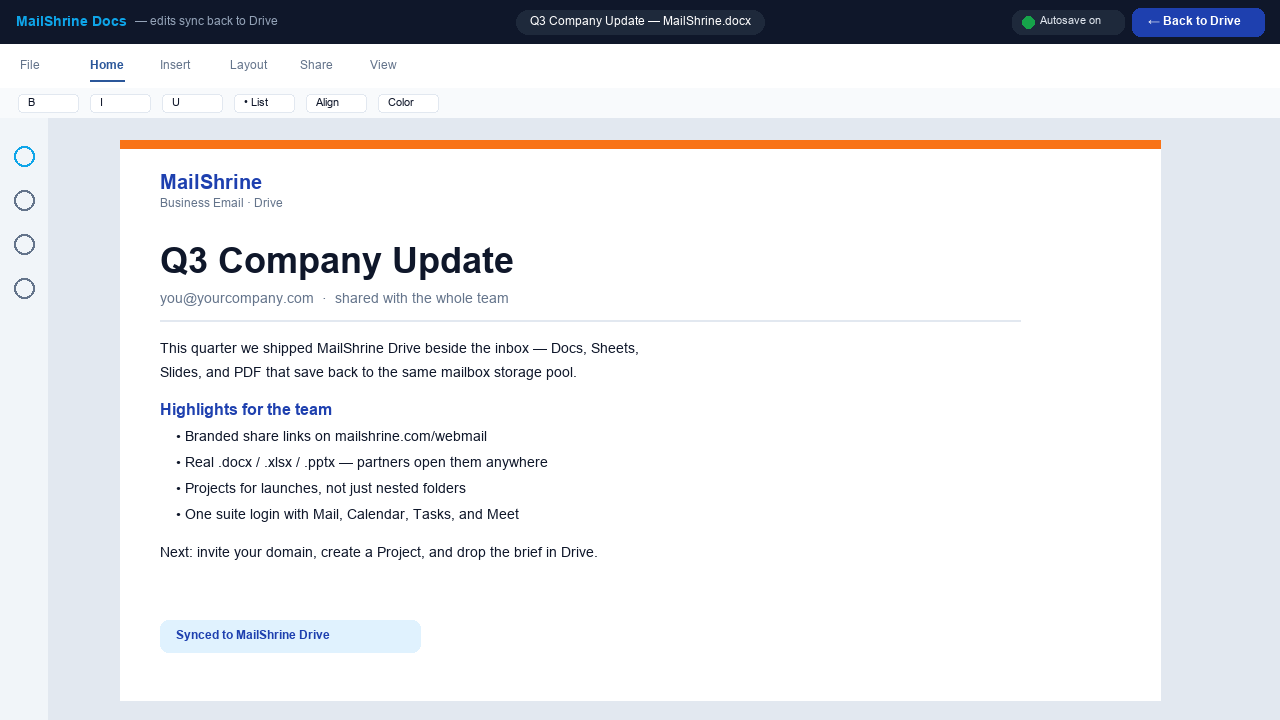
MailShrine Docs — real .docx with autosave syncing back to Drive.
01
Beside the inbox — not another login
Open Drive from the same 9-dot suite as Mail, Calendar, and Tasks. Your company files stay on the mailbox you already use.
02
Real Office files, not locked formats
Create and edit .docx, .xlsx, .pptx, and PDF — MailShrine Docs, Sheets, Slides, and PDF. Opens with partners who still live in Word and Excel.
03
Brand stays in the address bar
Docs, Browser, and share links resolve on mailshrine.com/webmail — not drive.google.com or onedrive.live.com.
04
Share without leaving MailShrine
People ACL plus Anyone with the link. Viewer, Commenter, or Editor — invites leave from your mailbox.
05
Projects, not just folders
First-class Projects for launches and clients. Filter by type, people, modified, or where the file came from — mail, meeting, calendar, or upload.
06
ZIP, Browser, one storage pool
Preview ZIP listings, compress or extract in place, open files in a branded Browser tab. Mail and Drive share one quota meter.
Drive feature comparison
Drive vs 15 cloud file products
Competitors across the top. Features down the side — grouped so you can scan one theme at a time. Features only; pricing later.
Suite fit
Where Drive lives relative to business email.
| Feature | MailShrine | OneDrive | Dropbox | Box | Zoho | iCloud | MEGA | pCloud | Proton | Sync | Nextcloud | Tresorit | ShareFile | Egnyte | IDrive | |
|---|---|---|---|---|---|---|---|---|---|---|---|---|---|---|---|---|
Inside business email suite Same 9-dot launcher as mail | ✓ | ~ | ~ | × | × | ~ | ~ | × | × | ~ | × | × | × | × | × | × |
Same login as the mailbox | ✓ | ✓ | ✓ | × | × | ✓ | ✓ | × | × | ✓ | × | ~ | × | × | × | × |
One storage pool with mailbox | ✓ | ✓ | ~ | × | × | ~ | ✓ | × | × | ~ | × | ~ | × | × | × | × |
Share invites from your mailbox | ✓ | ✓ | ✓ | ~ | ~ | ✓ | ~ | ~ | ~ | ✓ | ~ | ~ | ~ | ~ | ~ | ~ |
Brand URL stays on your suite mailshrine.com — not a third-party drive host | ✓ | × | × | × | × | × | × | × | × | × | × | ~ | × | × | × | × |
Filter files by mail / meeting / calendar | ✓ | × | × | × | × | × | × | × | × | × | × | × | × | × | × | × |
Files & editors
What you can create and open without leaving Drive.
| Feature | MailShrine | OneDrive | Dropbox | Box | Zoho | iCloud | MEGA | pCloud | Proton | Sync | Nextcloud | Tresorit | ShareFile | Egnyte | IDrive | |
|---|---|---|---|---|---|---|---|---|---|---|---|---|---|---|---|---|
Docs · real .docx in suite | ✓ | ~ | ✓ | ~ | ~ | ✓ | ~ | × | × | × | × | ~ | × | ~ | ~ | × |
Sheets · real .xlsx in suite | ✓ | ~ | ✓ | ~ | ~ | ✓ | ~ | × | × | × | × | ~ | × | ~ | ~ | × |
Slides · real .pptx in suite | ✓ | ~ | ✓ | ~ | ~ | ✓ | ~ | × | × | × | × | ~ | × | ~ | ~ | × |
PDF edit / annotate in suite | ✓ | ~ | ~ | ~ | ~ | ~ | ~ | × | × | × | × | ~ | × | ~ | ~ | × |
ZIP list · compress · extract in Drive | ✓ | ~ | ~ | ~ | ~ | ~ | × | ~ | ~ | × | × | ~ | × | ~ | ~ | ~ |
Projects (beyond folders) | ✓ | ~ | ~ | ~ | ~ | ~ | × | × | × | × | × | ~ | × | ~ | ✓ | × |
Viewer / Commenter / Editor sharing | ✓ | ✓ | ✓ | ✓ | ✓ | ✓ | ~ | ~ | ~ | ~ | ~ | ✓ | ✓ | ✓ | ✓ | ~ |
Back to Drive from every editor | ✓ | ✓ | ✓ | ~ | ~ | ✓ | ~ | × | × | × | × | ~ | × | ~ | ~ | × |
Suite · Video · Meeting
LiveMeet now + lobbyYou start the call. They join on MailShrine.
Meet now from the suite, Contacts, or an email thread. Guests open mailshrine.com/webmail — wait in the lobby until you admit them. Calendar keeps upcoming video beside mail. Invite by email or copy the link. Same brand in the tab, not a random meet domain. Meetings (Meet now + lobby) is on Solo and above.
Host view
Meetings in the suite — Meet now, join when ready, then run the room.
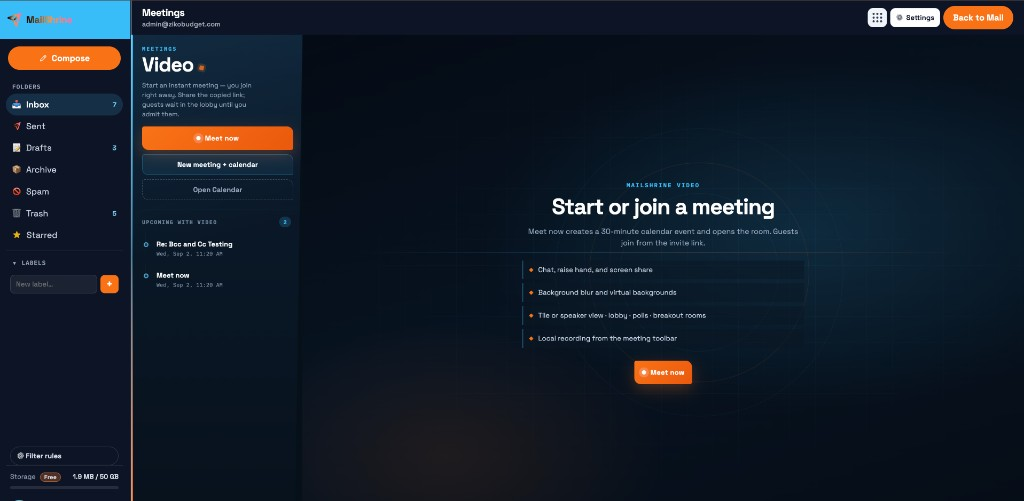
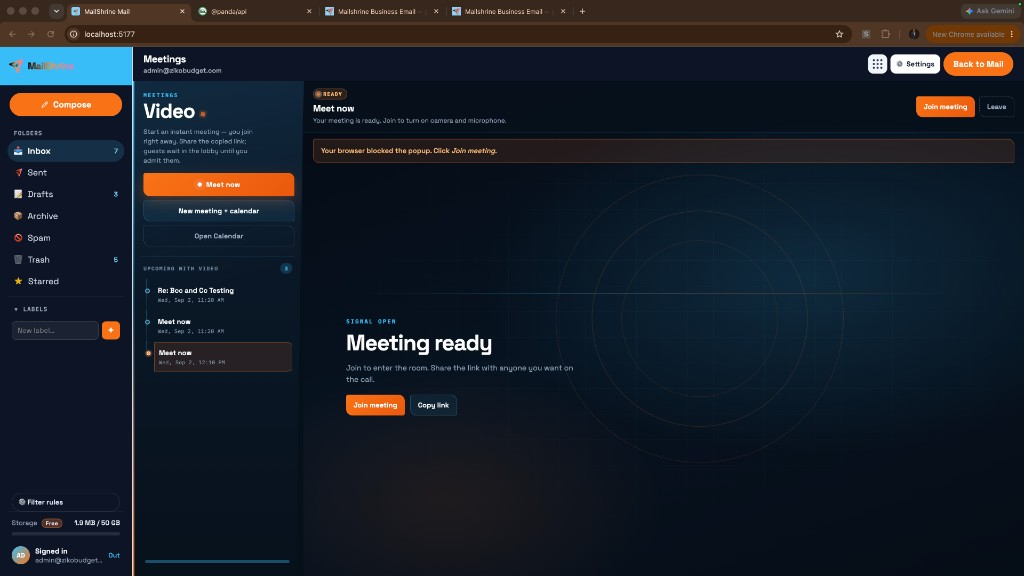
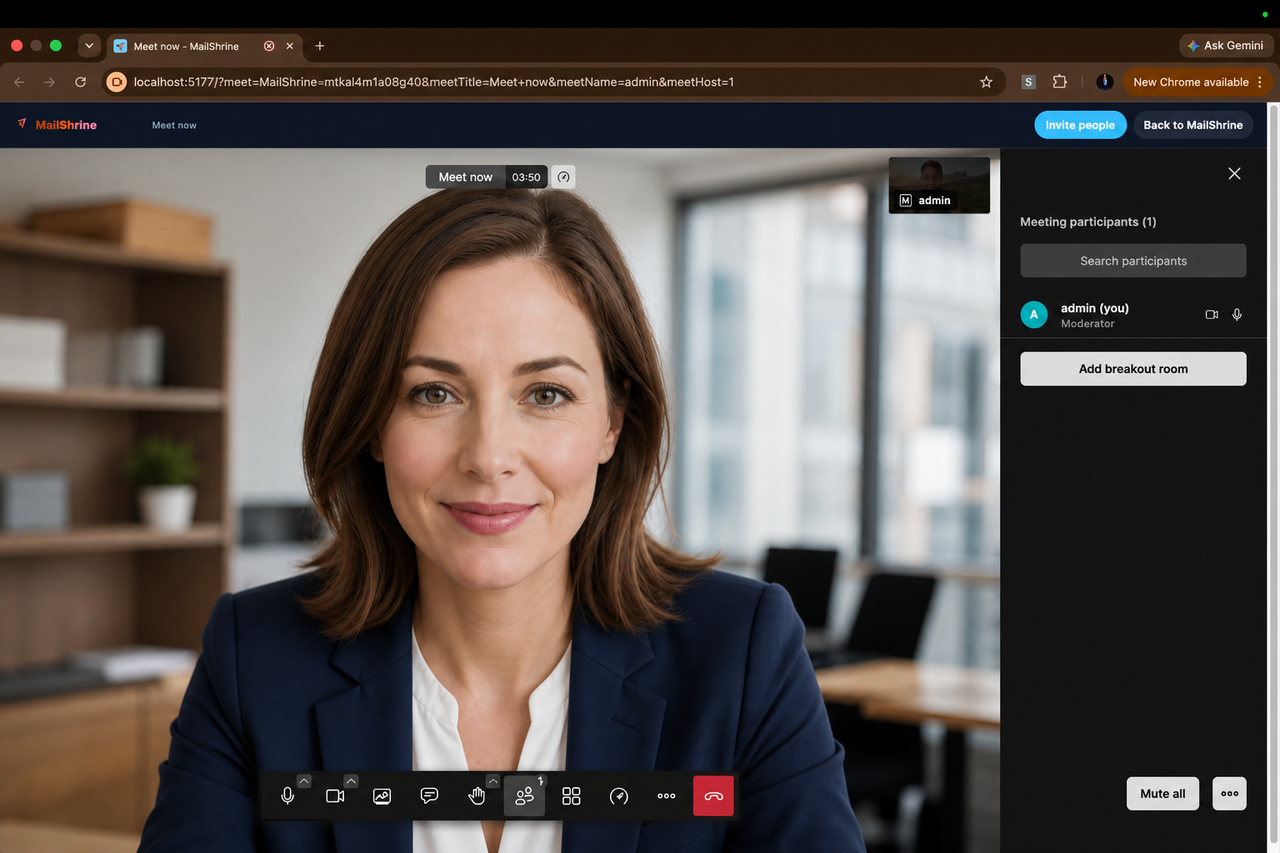
Chat, raise hand, screen share, lobby, polls, breakout rooms — local recording from the toolbar.
Guest view
Same meeting from the invite — join, then wait for admit. No mailbox required.
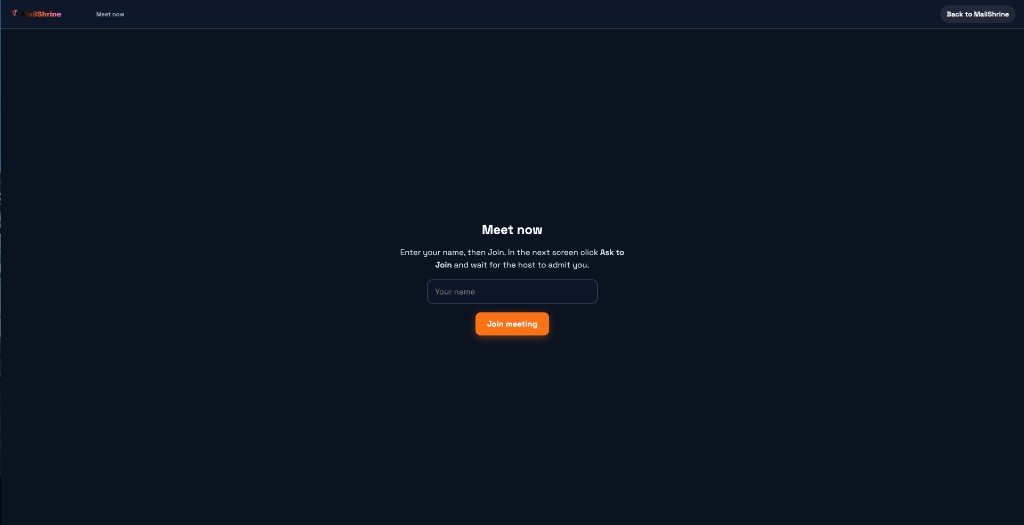
Guests open the MailShrine link, enter a name, join, then wait for the host to admit them.
01
Meet now from the suite
Instant video from the 9-dot launcher. You join right away — the room opens on a MailShrine tab while mail stays put.
02
Start from Contacts
Pick a contact and start a video call. MailShrine auto-invites them with the join link — no separate scheduling dance.
03
Start from an email thread
Choose guests on the thread, fire Meet now, and invites go out automatically. The call stays tied to the conversation.
04
Lobby — you admit guests
Guests wait until you let them in. Host controls the room; knock alerts keep you aware without dropping into spam.
05
MailShrine-branded rooms
Guests stay on mailshrine.com/webmail URLs and a MailShrine tab — not a third-party meet domain in the address bar.
06
Calendar-linked & shareable
Upcoming with video sits beside Meet now. Invite by email, copy the link, or drop Join video on the guest RSVP page.
Cost comparison
Compare business email costs
Same mailbox count and storage target. Live estimates across 29 providers — change either number and watch prices and GB update. Ranked by monthly price; storage shown on every row.
Comparing 5 mailboxes needing at least 5GB each · 28 of 29 providers meet that storage · unlimited domains on MailShrine
Lowest estimate: MailShrine Business Email at $2.00/mo · 15GB/mailbox — about $33/mo less than Google Workspace Starter and $10/mo less than Titan Professional avg.
29 of 29 providers ranked
Price is the ranking axis; storage is shown so cheap low-GB plans don’t look like a false win. MailShrine bands: Free 2 · Solo 2–5 · Team 6–15 · Business 16–50 · Custom 51+. Storage on MailShrine packs: Free 2GB · Solo 15GB · Team 30GB · Business 100GB per mailbox.
Feature comparison
MailShrine vs the field
Competitor names across the top. Features down the side — grouped so you can scan one theme at a time. Features only; pricing later.
Inbox & organization
Reading, sorting, and everyday inbox control.
| Feature | MailShrine | Microsoft | Zoho | WhoGoHost | HostAfrica | Truehost | Web4Africa | Fastmail | Proton | Titan | Namecheap | Migadu | |
|---|---|---|---|---|---|---|---|---|---|---|---|---|---|
Custom domain mailbox | ✓ | ✓ | ✓ | ✓ | ✓ | ✓ | ✓ | ✓ | ✓ | ✓ | ✓ | ✓ | ✓ |
Modern browser webmail | ✓ | ✓ | ✓ | ✓ | ~ | ~ | ~ | ~ | ✓ | ✓ | ✓ | ~ | ~ |
Labels + filter rules | ✓ | ✓ | ✓ | ✓ | ~ | ~ | ~ | ~ | ✓ | ~ | ~ | ~ | ~ |
Themes + inbox layouts | ✓ | ~ | ~ | ~ | × | × | × | × | ~ | ~ | ~ | × | × |
Compose & send
Writing mail, templates, schedule, and undo.
| Feature | MailShrine | Microsoft | Zoho | WhoGoHost | HostAfrica | Truehost | Web4Africa | Fastmail | Proton | Titan | Namecheap | Migadu | |
|---|---|---|---|---|---|---|---|---|---|---|---|---|---|
Recipient chips + paste-many | ✓ | ✓ | ✓ | ✓ | × | × | × | × | ✓ | ✓ | ✓ | × | × |
Schedule send | ✓ | ✓ | ✓ | ✓ | × | × | × | × | ✓ | ~ | ✓ | × | × |
Undo send | ✓ | ✓ | ✓ | ✓ | × | × | × | × | ✓ | ~ | ✓ | × | × |
Email templates (full editor) | ✓ | ~ | ~ | ✓ | × | × | × | × | ~ | × | ✓ | × | × |
One compose for new / reply / templates | ✓ | ~ | ~ | ~ | × | × | × | × | ~ | ~ | ~ | × | × |
Where MailShrine stands out
Features most competitors don’t match.
| Feature | MailShrine | Microsoft | Zoho | WhoGoHost | HostAfrica | Truehost | Web4Africa | Fastmail | Proton | Titan | Namecheap | Migadu | |
|---|---|---|---|---|---|---|---|---|---|---|---|---|---|
Floating compose over Settings Keep drafting while you change settings | ✓ | × | × | × | × | × | × | × | × | × | × | × | × |
Contact import with undo | ✓ | × | × | × | × | × | × | × | × | × | × | × | × |
Report a bug → admin Support | ✓ | × | × | × | × | × | × | × | × | × | × | × | × |
Same login as Email Marketing Campaigns + business inbox, one account | ✓ | × | × | × | × | × | × | × | × | × | × | × | × |
Team access invite (shared mailbox) Team and above — invite colleagues without sharing the password | ✓ | ~ | ~ | ~ | × | × | × | × | ~ | ~ | × | × | × |
Mailbox event log | ✓ | ~ | ~ | ~ | × | × | × | × | × | × | × | × | × |
Platform & suite
Clients, contacts, and the productivity suite around your inbox.
| Feature | MailShrine | Microsoft | Zoho | WhoGoHost | HostAfrica | Truehost | Web4Africa | Fastmail | Proton | Titan | Namecheap | Migadu | |
|---|---|---|---|---|---|---|---|---|---|---|---|---|---|
JMAP-first + IMAP/SMTP cheat-sheet | ✓ | ~ | ~ | ~ | ~ | ~ | ~ | ~ | ✓ | ~ | ~ | ~ | ✓ |
Address book app | ✓ | ✓ | ✓ | ✓ | ~ | ~ | ~ | ~ | ✓ | ✓ | ✓ | ~ | × |
Calendar | ✓ | ✓ | ✓ | ✓ | ~ | ~ | ~ | ~ | ✓ | ✓ | ✓ | ~ | × |
Tasks | ✓ | ✓ | ✓ | ✓ | × | × | × | × | ~ | ~ | ~ | × | × |
Drive (files) | ✓ | ✓ | ✓ | ✓ | ~ | ~ | ~ | ~ | × | ✓ | ~ | × | × |
Customizable logo, color & theme | ✓ | ~ | ~ | ~ | × | × | × | × | ~ | ~ | × | × | × |
Meetings (9-dot launcher) | ✓ | ✓ | ✓ | ✓ | × | × | × | × | × | × | × | × | × |
Meeting Meet now, lobby admit, calendar-linked video | ✓ | ✓ | ✓ | ✓ | × | × | × | × | × | ~ | × | × | × |
Setup
Live on your domain in four steps
Add the domain, publish DNS, create mailboxes, then send as you@yourcompany.com — guided inside the dashboard.
Step 1
Add your company domain
Connect the domain you already own inside Business Email Domains — no second MailShrine signup.
Step 2
Publish MX, SPF, DKIM, and DMARC
Copy the exact records from the Domains screen into your DNS panel (Namecheap, Cloudflare, GoDaddy, and others).
Step 3
Create mailboxes for your team
Start with you@yourcompany.com, then add aliases like hello@ or invite teammates to shared inboxes.
Step 4
Send from webmail or your apps
Use MailShrine webmail, or connect Outlook / Apple Mail with the IMAP & SMTP settings helpers.
FAQ
Questions about Business Email
Setup, DNS, webmail, plans, and more — same answers we show in the product Help & Support page. Still stuck? Contact us.
Open the Domains tab, enter your domain (for example company.com), and start setup. MailShrine shows the DNS records to add at your registrar (Namecheap, Cloudflare, GoDaddy, etc.). After you save those records, start verification — you can leave the page while we keep checking.
Free includes 2 mailboxes and 2 aliases (workspace-wide). Solo is for up to 5 mailboxes with unlimited aliases. Team covers up to 15 mailboxes, Business up to 50, and Custom is for 51+. Domains are unlimited on every plan. Exact limits for your account appear under Overview and Billing.
Create mailboxes from the Mailboxes tab after your domain is verified and the mail server accepts the domain. If DNS looks good but mail setup is still pending, use Retry mail setup on that domain, then create the mailbox. Your plan mailbox cap still applies.
Verification looks for three records shown on the Domains setup screen with copy buttons: (1) MX pointing to mail.mailshrine.com with priority 10, (2) a TXT SPF record that includes our mail IP (typically v=spf1 ip4:198.98.58.18 ~all), and (3) a TXT DMARC record (we suggest starting with p=none for monitoring). Always copy the exact values from your dashboard.
Often a few minutes, but worldwide DNS can take up to 24–48 hours. After you add the records, click verify / check status on Domains. You can leave and come back — we’ll mark the domain verified when MX, SPF, and DMARC pass.
Go to Mailboxes → open a mailbox’s settings → Aliases. Enter a local part (for example billing) and add it for that domain. Alias limits are workspace-wide: Free includes 2 total; Solo and above include unlimited aliases. If you hit the Free cap, upgrade under Billing.
Shared mailbox (Team access) is on Team, Business, and Custom. In Mailboxes, open settings → Team access. Invite a coworker with their email; they get a link to set a password and open that shared mailbox in webmail. Invites expire after 7 days — you can resend or revoke anytime.
From Mailboxes, use Webmail Login / Open Webmail. It opens MailShrine webmail with that address prefilled so you only need the mailbox password. Use the mailbox password you set when creating (or resetting) the mailbox — not your dashboard login, unless they happen to be the same.
In webmail, open Settings → Quick setup. Every plan can use Quick setup. Download the iOS profile or follow the Outlook / Gmail (Android) steps and copy the IMAP/SMTP values shown. For full developer IMAP details, Solo and above also have Settings → Developer settings.
Free: Mail, Address book, Calendar, and Drive (Docs, Sheets, Slides, PDF, ZIP) — $0 / ₦0 forever, no card. Solo adds unlimited aliases, IMAP/SMTP/JMAP/CalDAV, schedule send, templates, vacation reply, contact import, Tasks, Meetings (Meet now + lobby), Priority Inbox, and themes. Team adds company branding, branded calendar invites, shared mailbox access, mailbox event log, and Gmail/Yahoo/Microsoft import. Business and Custom add 100 GB Drive and company meetings (screen share, polls, breakouts, local recording).
Yes on Team and above. In webmail open Settings → Accounts & Imports (migration helpers) and follow the guided import. Free and Solo users should upgrade under Billing, or move mail manually with a desktop client if they already have IMAP access elsewhere.
Open Billing in the sidebar, compare Free / Solo / Team / Business, and upgrade to the band that matches how many mailboxes you need. For 51+ mailboxes or special limits, use the Custom plan request on Billing. New mailbox and alias limits apply as soon as the plan is active.
Storage is per mailbox: Free includes 2GB, Solo 15GB, Team 30GB, and Business 100GB. The same numbers appear on Business Email pricing and the comparison table. Confirm live cards on /products/business-email/pricing.
Checkout on Billing accepts major credit and debit cards through our secure payment flow. Receipts and past charges appear in the billing history section on the Billing tab.
First confirm the domain is fully verified (MX, SPF, and DMARC all green on Domains). Incomplete or wrong DNS is the most common cause. Then avoid spammy subject lines, warm up new domains gradually, and make sure you’re sending from addresses on that domain. If problems continue after DNS is green, open a support ticket with the domain and a sample message header.
If the mail server didn’t finish provisioning, the mailbox may show Repair setup. Use that action to retry. For domains, if DNS is OK but mail setup is still pending, use Retry mail setup on Domains. If it still fails, submit a Support ticket with the mailbox address and what you clicked.
In Mailboxes, open the mailbox settings and choose reset password. The new password is what you use in webmail and in IMAP/SMTP clients. Dashboard account password (Settings in this app) is separate from each mailbox’s password.
Use the Contact Support form in your Business Email dashboard (Help & Support) — tickets go to our Business Email support queue and we aim to reply within 24 hours on business days. You can also email support@mailshrine.com.
Ready for you@yourcompany.com?
Use your MailShrine account — 2 professional mailboxes — free forever. Calendar and Drive included. 2 aliases. No card.