01
Founders & small teams
Newsletters and launches without a seat tax or a bloated CRM.
MailShrine
Email Marketing
No spam.
1 credit = 1 email. Start with 2,000 free credits — campaigns, newsletters & drips, no tax on the list.
01 — The product
MailShrine Email Marketing is the campaign workspace: lists, compose, preview, schedule, and delivery health. Same account as the rest of the suite — built so growing a list never raises the bill.
Credits
100,000
Remaining balance
Emails sent
300,000
Campaign total
Credits used
300,000
Matched to sends
1 credit = 1 email
1 : 1
No list tax
The send desk
Connect an inbox, upload a list, write the email, and go. Credits move only when mail leaves — not for storing the audience.
Free at signup
2,000 email credits
Pay on send
1 credit = 1 email
No list tax
Contacts stay free
Campaign stats
Send desk · last 6 months
1 credit = 1 email
Credits
100,000
100,000 credits remaining
Emails sent
300,000
300,000 emails sent
Credits used vs emails sent
Jun: 57,000 credits used · 57,000 emails sent
| Month | Jan | Feb | Mar | Apr | May | Jun |
|---|---|---|---|---|---|---|
| Credits used | 38,000 | 44,000 | 52,000 | 48,000 | 61,000 | 57,000 |
| Emails sent | 38,000 | 44,000 | 52,000 | 48,000 | 61,000 | 57,000 |
Who it’s for
If you already have a list — or you’re about to import one — this is the send desk. Not a contact warehouse with a monthly surcharge.
01
Newsletters and launches without a seat tax or a bloated CRM.
02
Campaigns, drips, and list uploads that stay simple when volume climbs.
03
Keep every shopper on the list. You pay when a message goes out — not for quiet contacts.
04
SMTP control, pause/resume, and credit packs you can top up per client send.
02 — Sending
SMTP Configuration lists each method on its own. Add Gmail, Microsoft, Yahoo, Custom SMTP, and MailShrine Cloud — one inbox or many. Same campaign desk either way.
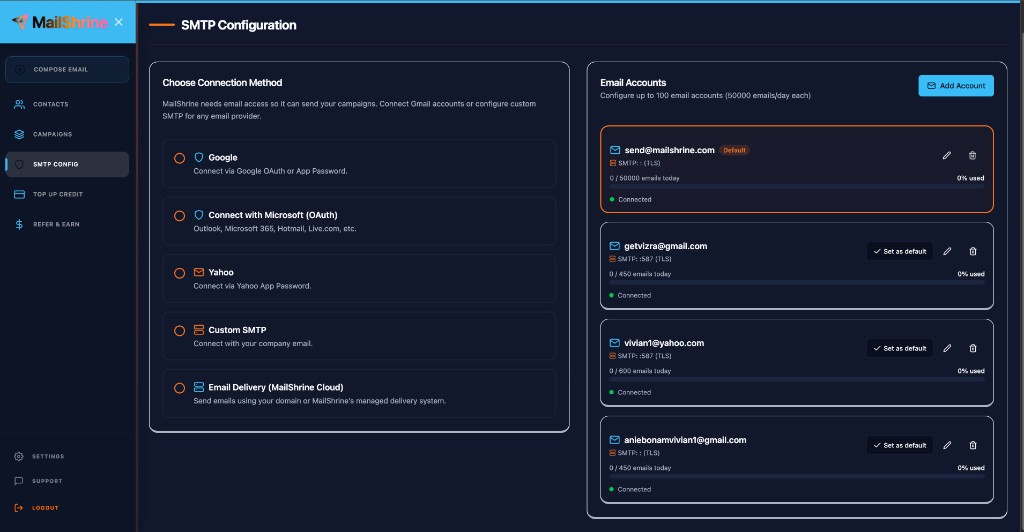
The five methods
Jump to a provider, or read them in order. Each method includes what it is, who it’s for, and why you’d pick it. MailShrine Cloud has two phases if you want us to deliver.
01
02
03
04
05
MailShrine delivers the mail. You don’t connect Gmail, Microsoft, Yahoo, or Custom SMTP. Two phases — start instantly, or put your domain on the From line.
Phase 1
Send now on MailShrine’s managed domain. No DNS. No customer SMTP. Add a reply-to so answers reach you. From shows MailShrine until you connect a domain.
Pick this to launch today.
Phase 2
Verify your domain in Cloud. Campaigns send as you@yourdomain.com — your brand in From, stronger inbox trust. Same Cloud delivery. Recommended once you’re ready.
Pick this when the From line should be yours.
03 — Contacts
Contact Management holds folders and files. Compose pulls those same lists with Use Saved Contacts. Growing the audience is free — credits move only on send.
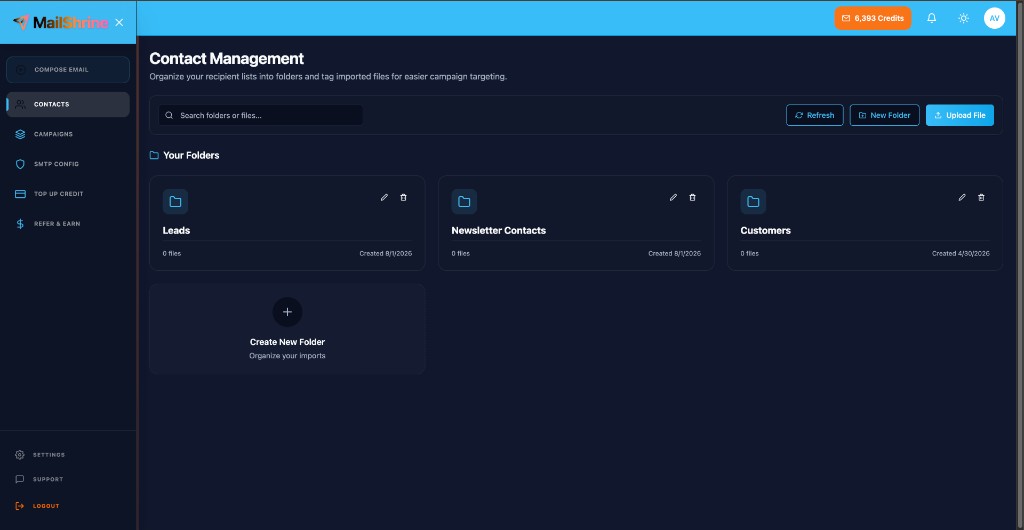
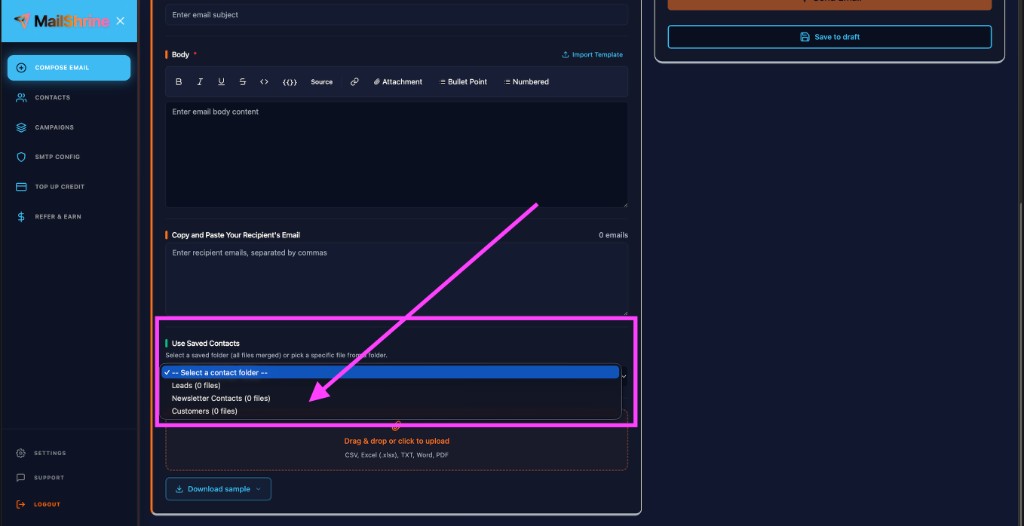
Leads, newsletter, customers — group files the way you campaign. List size never changes the price.
CSV, Excel (.xlsx), TXT, Word, or PDF. Preview valid, invalid, and duplicate rows before they hit a campaign.
Protect your sender reputation before you send. MailShrine can clean campaign contacts and identify invalid, risky, duplicate, disposable, or problematic email addresses before they are used in your campaign — included with Email Marketing.
Download a sample with tags, map headers, then merge first names and fields into the body when you compose.
In Compose, pick a folder (all files merged) or one file. No re-pasting the same list every send.
Tags, in practice
Upload a sheet with First Name, Last Name, Email, and Phone. Click a column tag — it lands in the compose field as a chip. On send, each row fills its own values.
1 · Your list
contacts.xlsx| AFirst Name | BLast Name | CEmail | DPhone | |
|---|---|---|---|---|
| 1 | Ada | Okonkwo | ada@northloop.co | +234 803 441 2291 |
| 2 | Marcus | Chen | marcus@northloop.co | +1 415 555 0192 |
| 3 | Ife | Adeyemi | ife@studioife.com | +234 809 112 8804 |
Click a column tag to drop it into compose
2 · Compose
New campaign
Subject
Launch note for
Email body
3 · What Ada receives
Hi Ada, We just opened early access for your team. We’ll reach you at ada@northloop.co.
04 — Campaign studio
Upload the list. Write the email. Send a preview to yourself. Schedule or go now. Your credit balance sits in the header before you launch.
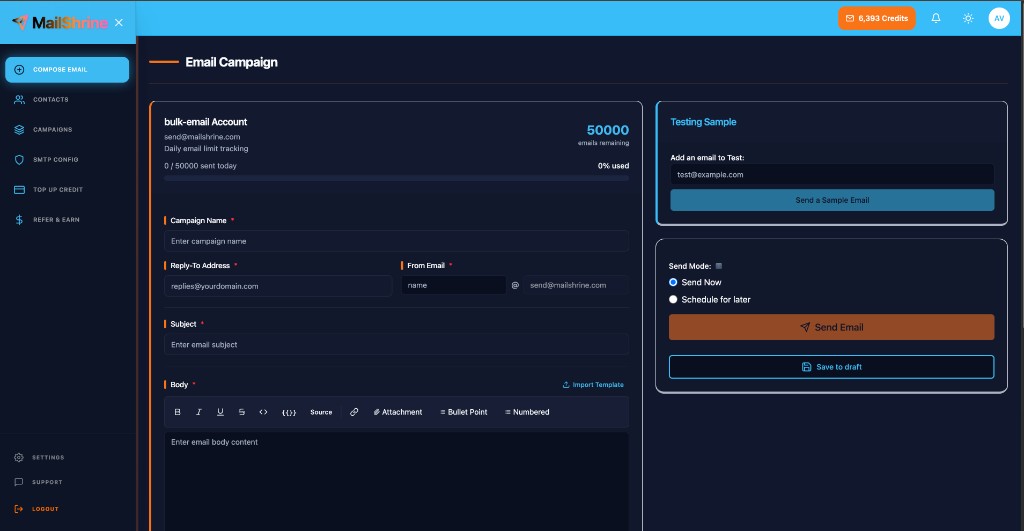
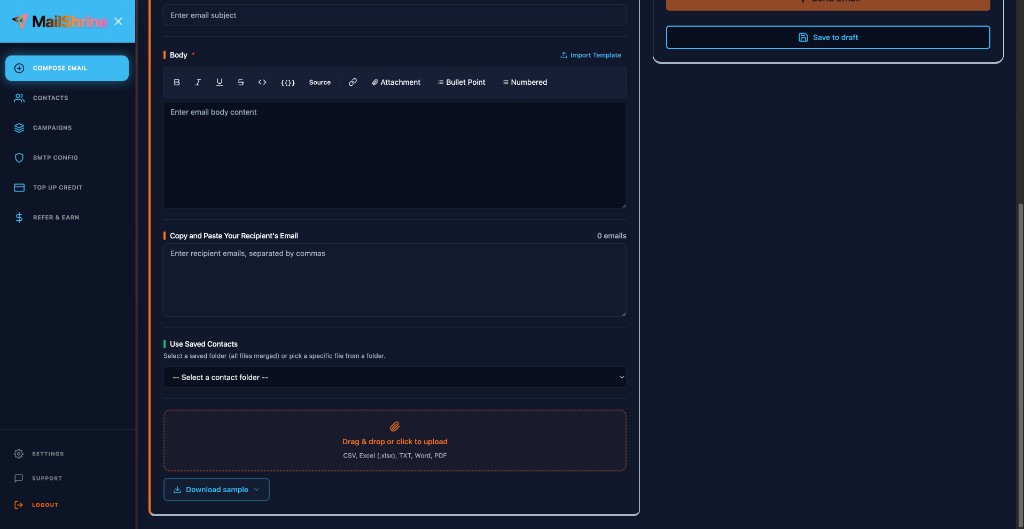
Campaign name, subject, body, footer, from name, reply-to, and attachments. Import a template when you don’t want a blank page.
Send a sample to yourself first. The form stays put — preview never wipes the draft.
Pick a datetime or hit send. Unsaved work restores when you come back.
Upload a tagged spreadsheet and drop column headers into the body so each recipient gets their line.
05 — Control
A campaign isn’t fire-and-forget. Stop a send mid-flight, pick it back up, or duplicate the one that worked. If Cloud review flags the copy, you see why.
Stop a live send. Start it again. Cancel what you don’t want. Clone a winner for the next drop.
Cloud campaigns go through content review. Risky copy is flagged with a reason — it waits for a look instead of hitting the list.
Draft, scheduled, sending, paused, flagged, rejected, completed. Filter the list. Open the reason. Do the next thing.
Sent and status sit next to the controls. Bounce and delivery live in Tracking — here you steer the campaign.
Campaigns
Sending · 2,184 of 5,000
AI review: clear. Flagged campaigns sit in review with a reason — they don’t send until someone acts.
06 — Tracking
Every MailShrine Cloud campaign reports delivery health. Bounce rate is the number that saves the next send. High bounce means the list needs a cut — not another blast.
01
A bounce means the inbox never took the message — dead address, full mailbox, or a blocked domain. Permanent bounces land on your suppression list so the next campaign skips them.
02
A high bounce rate tells providers the list is dirty. That drags delivery for the rest of the send — and the next one. Watch the rate before you scale.
03
Cloud campaigns show sent, delivered, opens, clicks, complaints, rejects, delivery rate, and bounce rate. You see who got it — and who didn’t.
Bounce rate
Campaign tracking · MailShrine Cloud
C8 bounce
0.80%
Dirty list 12.3%
Delivery rate
99.2%
Bounce rate
0.80%
07 — Unsubscribe
Every send includes an Unsubscribe link and a one-click header. Opt-outs go on your suppression list. The next campaign skips them — no extra step, no wasted credit.
01
Campaigns carry a signed Unsubscribe link plus a one-click header. People can leave from the footer — or from the Unsubscribe control in their inbox.
02
Opt-outs land on your suppression list. Future campaigns skip those addresses automatically. No accidental re-mail.
03
Credit balance stays in the workspace header. You see remaining sends before launch — and you never spend a credit on a suppressed inbox.
What every campaign includes
You still choose who you email. MailShrine handles the unsubscribe plumbing and the suppression skip so a campaign can’t quietly ignore an opt-out.
08 — Credits
2,000 free email credits at signup. 1 credit = 1 email. Then buy a pay-as-you-go pack, a monthly plan, or custom volume at 50,000+. Credits sit in your balance until you use them — they don’t expire. Bonus credits are included in the advertised total.
Free at signup
Free
2,000 email credits
No credit card. 1 credit = 1 email. Send your first campaigns, then top up only when you need more — credits never expire.
✓ Email Sanitization included for campaign contacts
Starter
1,500 total credits (1,400 + 100 bonus)
First pack. Credits never expire.
✓ Email Sanitization included for campaign contacts
Best for most lists
Macro
5,000 total credits (4,500 + 500 bonus)
The usual campaign month.
✓ Email Sanitization included for campaign contacts
Value
20,000 total credits (19,000 + 1,000 bonus)
Volume without a contact tier.
✓ Email Sanitization included for campaign contacts
Email Sanitization is included when cleaning contacts for MailShrine Email Marketing campaigns. Standalone sanitization and exports outside Email Marketing use the separate Email Sanitization plans.
Mailchimp-style tools raise the bill when the list grows. Here the list is free. Top up from the dashboard when you have a send — monthly plans if you like a rhythm, custom quotes when you’re past 50,000 emails.
Email Marketing and Email Sanitization
Email Sanitization included with Email Marketing
Email Sanitization is included when cleaning contacts for MailShrine Email Marketing campaigns. Standalone sanitization and exports outside Email Marketing use the separate Email Sanitization plans.
Contact folders are shared. Clean campaign contacts in Email Sanitization or during compose, then send from Email Marketing.
09 — Refer & earn
Referrals aren’t a buried affiliate portal. They’re in the same sidebar as Compose and Top Up — share the link, watch signups, and earn when they buy credits.
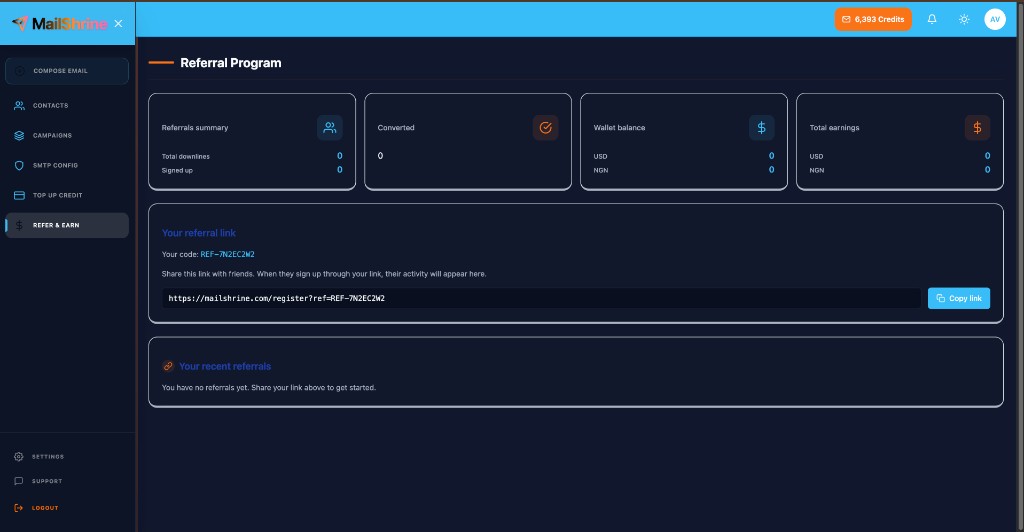
Copy the unique referral URL from Refer & Earn. Your code rides on every signup.
When someone you invited tops up, it shows as a converted referral in the dashboard.
A cut of what they spend — typically 10% — tracked in USD and NGN. Wallet balance sits next to the campaign desk.
10 — Compare
Same list. Same sends. Live estimates across 47 platforms — pick a scenario or type your own numbers and watch every competitor update. MailShrine uses credit packs from live pricing. No seats. No per-contact tax.
Example: Adaobi has 2,500 subscribers and sends 2 newsletters a month → 5,000 emails. MailShrine covers that with live credit packs from /pricing. Contact-based tools still bill for the whole list even in quiet weeks.
≈ 5,000 emails this month · 2,500 contacts × 2 campaigns
World's cheapestMailShrine ranks #1 at $6.00/mo for this setup — about $54.00/mo less than Mailchimp.
47 of 47 platforms ranked
Competitor figures are educational approximations of public 2026 list prices and promos — plans change. MailShrine amounts match pay-as-you-go / monthly packs on /pricing when live. Click any row to expand the estimate note.
11 — FAQ
Credits, sending connections, lists, tracking, and compliance — answers that apply to Email Marketing, not the whole suite.
MailShrine Email Marketing is a pay-per-send campaign tool. You connect Gmail, Microsoft, Yahoo, Custom SMTP, or MailShrine Cloud, upload contacts, compose or schedule campaigns, and pay with credits — 1 credit = 1 email. Idle contacts on your list don’t raise the bill.
Yes. New accounts get 2,000 free email credits (1 credit = 1 email) with no credit card. That’s 2,000 real campaign emails before you buy anything. When those are used, add a pay-as-you-go pack or a monthly plan — unused credits never expire.
1 credit equals 1 email sent. Sign up and you start with 2,000 free credits. After that, buy pay-as-you-go packs (Starter, Macro, Value, and more), pick a monthly plan, or request custom volume at high send counts. Credits sit in your balance until you use them — they never expire.
No. List size is free. Unlike Mailchimp-style tools that bill on stored contacts or profiles, MailShrine only spends credits when a campaign actually sends. Quiet months don’t tax the whole list.
Yes. Connect Gmail, Microsoft, Yahoo, or Custom SMTP, or use MailShrine Cloud. Cloud can Quick Send on MailShrine’s domain or verify your own domain for branded From addresses.
Your own inbox/SMTP (Gmail, Microsoft, Yahoo, Custom SMTP) sends through that connection’s limits and reputation. MailShrine Cloud is MailShrine-hosted sending — Quick Send for fast starts, or verify your domain when you want branding and deliverability controls on Cloud campaigns.
Upload CSV or Excel, organize folders and tags, and keep suppression lists for people who shouldn’t receive mail. You can reuse lists across campaigns without paying a contact storage fee.
Cloud campaigns can track delivery, bounce, opens, and clicks so you see what landed and what converted. Connected inbox sends follow that provider’s capabilities; use Cloud when you want full campaign analytics in MailShrine.
Yes. Email Marketing includes unsubscribe / one-click opt-out and suppression so you can stay aligned with common email rules. Always send to people who expect your mail and honor opt-outs promptly.
Yes. Pause, resume, cancel, or duplicate campaigns from the dashboard. You can also use inbox preview and scheduling before a send goes live.
For the same list size and send volume, credit packs are built to undercut contact-tax ESPs. Packs and monthly plans publish in USD and Naira on /pricing. Open Compare on this page, pick a scenario (or enter your contacts and campaigns), and see MailShrine ranked against dozens of competitors using educational 2026 list-price models.
Live pay-as-you-go and monthly prices are on /pricing in USD and Naira — including the Free card with 2,000 signup credits (Starter from $3 / ₦1,500). The dashboard Top up flow uses the same plans. Bonus credits may appear on some packs at checkout.
No. One MailShrine account covers Email Marketing, Business Email, Email Lead Generator, and other suite products. Open Email Marketing from the product switcher after you sign up.
Still stuck? Contact us · See live pricing
12 — Start
Launch with 2,000 free credits. Connect an inbox, upload the list, preview, and schedule. 1 credit = 1 email — no tax on the contacts sitting still.