Four moves. Bring the list in, read the marks, download what you want to keep, or open it in Email Marketing.
Bring the list
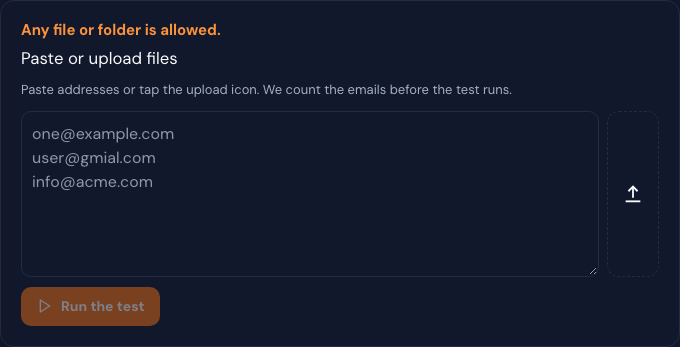
Paste addresses, or upload any file or a folder.
Run the test
Each address is marked Good, Bad, or Not checked.
Download
Take CSV, TXT, JSON, XML, Markdown, or Excel with your columns.
Open the campaign
Start it in Email Marketing. That button does not send.
Features
Eleven jobs, each with a screen
The picture is the product. The short line is the job. The checks are what you walk away with.
02
Clean a list
Bring the list you already have
Paste addresses, or upload any file or a whole folder. Then run the test. You see how many addresses were found before the clean starts.
Paste a column of addresses
Upload any file, or a folder of files
Run the test when the count looks right
Sanitize jobs · paste or upload · Run the test
03
The checks
Each address gets a plain mark
You are not left with a single score. Every check shows Good, Bad, or Not checked, so you can see why a row stayed or fell out.
Format, mail server, mailbox, and catch-all
Disposable, role, free provider, gibberish, traps, and previously bounced
Typo suggestion and duplicates
Mailbox and catch-all run when mailbox probing is on
Results · Good, Bad, or Not checked
04
Results and download
Page the rows, then take the file
A long list pages through so you can read it. Download the clean rows as CSV, TXT, JSON, XML, or Markdown. If you started from a spreadsheet, Excel is in the same menu and your original columns stay.
Page through the result table
CSV, TXT, JSON, XML, and Markdown
Excel keeps the columns you uploaded
Download · CSV, TXT, JSON, XML, Markdown, or Excel
05
Email Marketing
Open the clean list as a campaign
Start campaign in Email Marketing hands the clean addresses to the campaign screen on the same account. It opens Email Marketing. It does not send the campaign.
Uses the addresses that came back clean
Opens Email Marketing so you can write the message
Does not send for you
Start campaign in Email Marketing · opens the campaign, does not send
06
Contacts
Keep the original and a cleaned copy
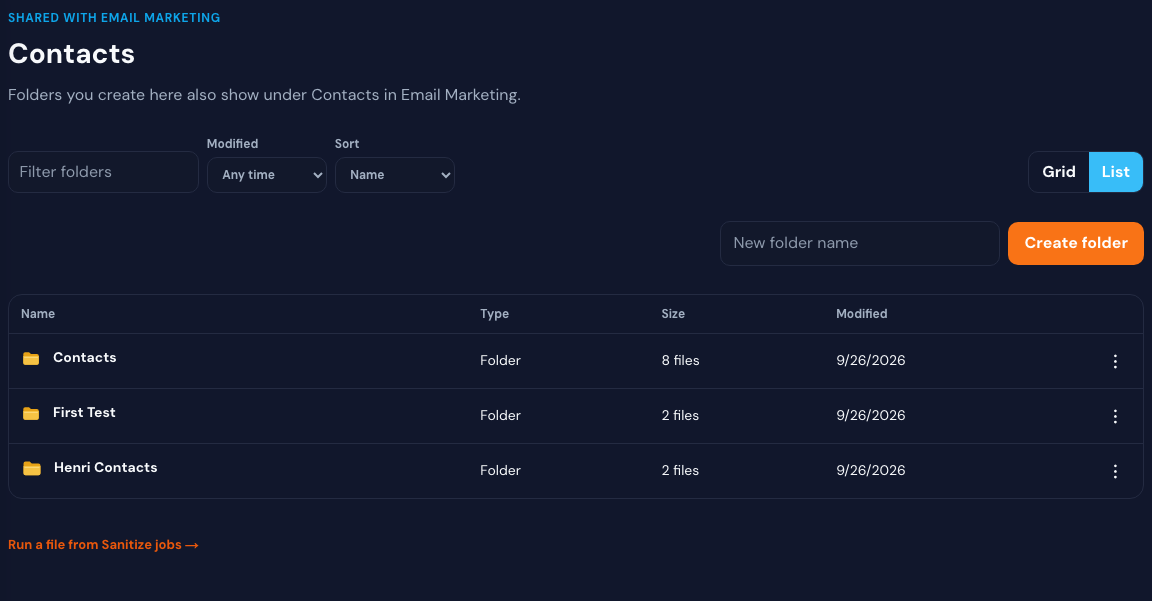
Folders here are the same folders as Email Marketing. After a clean, the folder can hold the file you brought in and a cleaned copy named sanitized- plus the original name.
Shared contact folders with Email Marketing
Original file stays put
Cleaned copy sits beside it
Contacts · folders shared with Email Marketing
07
One email
Check a single address for free
On Overview, type one address and check it. It is the same kind of check as a list, and it does not spend a credit.
Lives on Overview
One address at a time
Free — it does not spend a credit
Overview · one email, free
08
Signup form
Stop a bad signup before it is saved
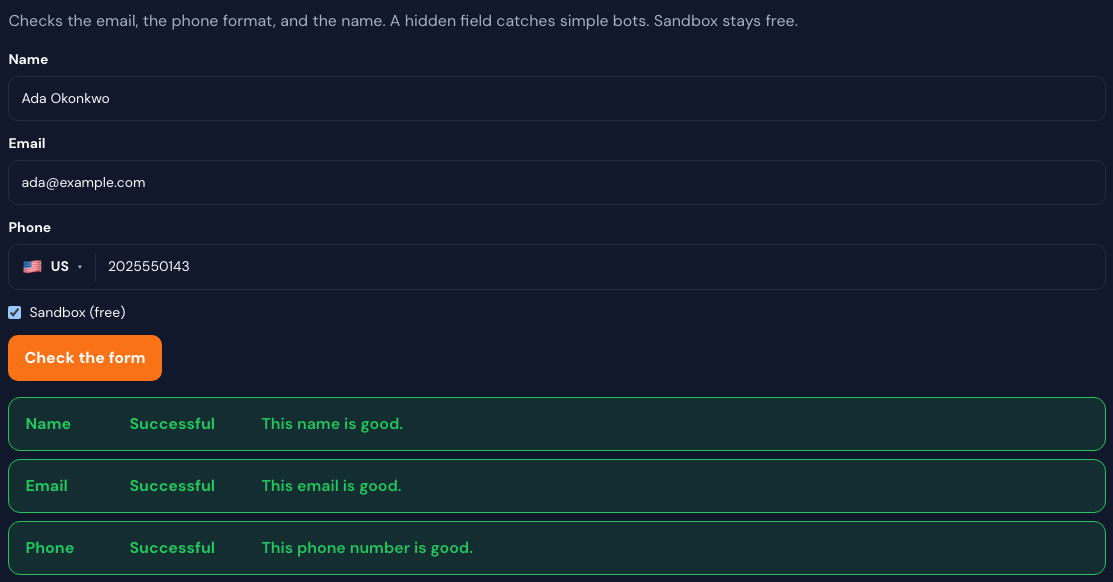
The signup form asks for a name, a phone number with a country, and an email. A hidden field catches simple bots. You get a row for each field: what passed, and why.
Name, phone with country, and email
Hidden field for simple bots
A result row for each field
Signup form · name, phone, email, and a result row for each
09
Your sending domain
See DMARC and public spam lists
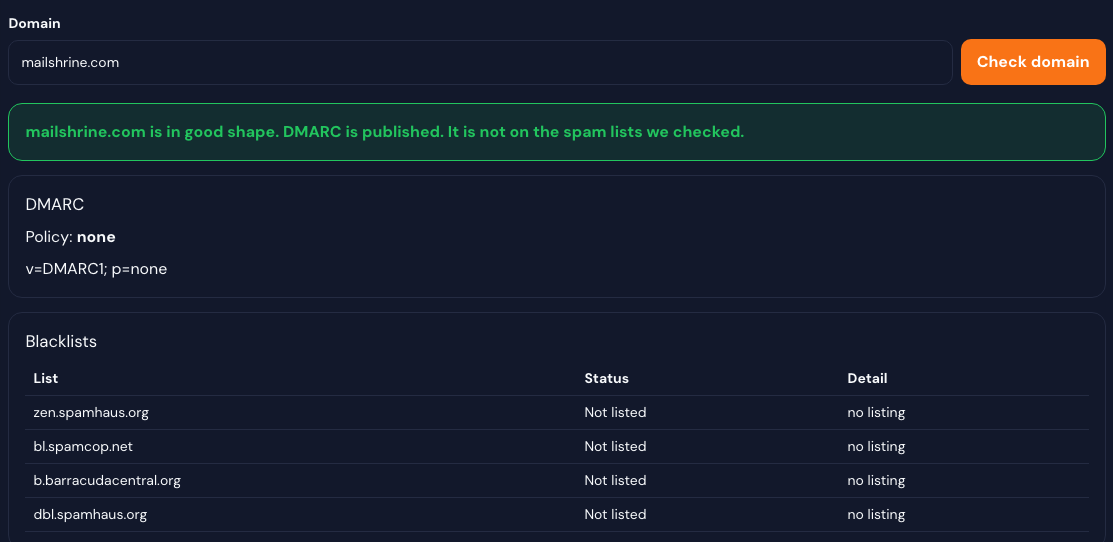
Check the domain you send from. You get the DMARC record, if one is published, and whether that domain is on the public spam lists we look up.
Looks up the DMARC record
Checks public DNS spam lists
Tells you, in one line, if the domain looks fine
Your domain · DMARC and public spam lists
10
API and form widget
Try it, then ship it
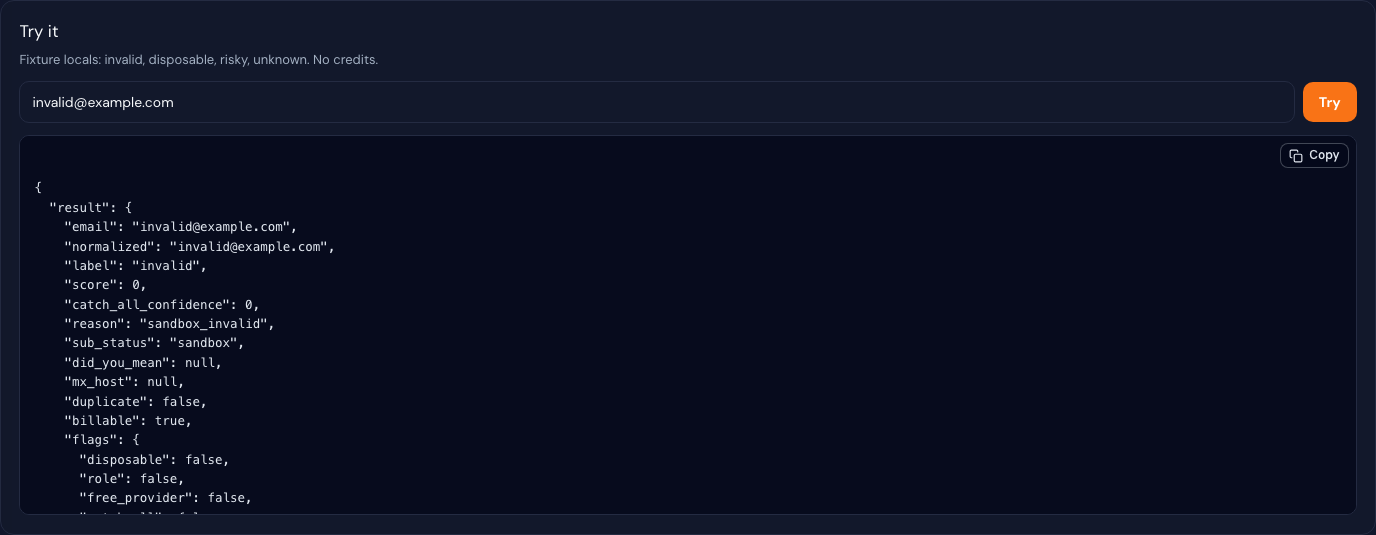
Developers get a try-it sandbox that does not spend credits, keys for their own forms, a form widget, and a webhook when a clean finishes. The same check is ready in cURL, JavaScript, Python, PHP, Ruby, Go, Java, and C# — one email on a signup form, and a list clean.
Try-it sandbox, no credits
Same check in cURL, JavaScript, Python, PHP, Ruby, Go, Java, and C#
One email on a signup form, or a list clean
Keys for the API and the form widget
Webhook when a clean finishes
API · try-it sandbox, no credits
11
The results table
Every column, and what the mark means
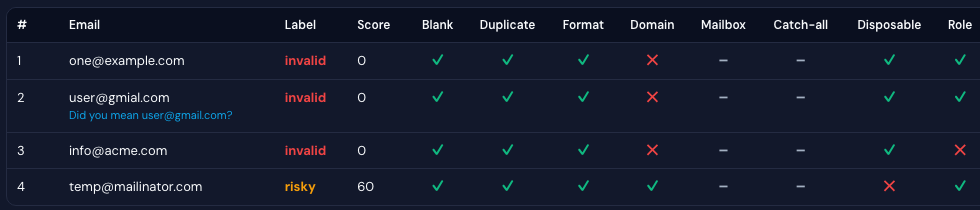
Each address gets one row. A green check means that problem was not found. A red X means it was. A dash means that check did not run for the row.
#
Email
Label
Score
Blank
Duplicate
Format
Domain
Mailbox
Catch-all
Disposable
Role
Free email
Gibberish
Trap
Bounced
Typo
1
one@example.com
invalid
0
✓
✓
✓
✕
–
–
✓
✓
✓
✓
✓
✓
✓
2
user@gmail.com
clean
88
✓
✓
✓
✓
–
–
✓
✓
✕
✓
✓
✓
✓
3
info@acme.com
invalid
0
✓
✓
✓
✕
–
–
✓
✕
✓
✓
✓
✓
✓
4
temp@mailinator.com
risky
60
✓
✓
✓
✓
–
–
✕
✓
✓
✓
✓
✓
✓
Results table · green check is Good, red X is Bad, dash is Not checkedScroll sideways to read every column
Label
The overall result for that row: clean, risky, invalid, unknown, mailbox full, or disabled.
Score
How safe the address looks, as a number. Higher is safer. A hard failure is 0.
Blank
The row had no address. A check means an address was there. An X means the row was empty.
Duplicate
The same address already appeared earlier in this list. An X means it is a repeat.
Format
The address is shaped like an email. An X means the syntax is broken, so later checks are skipped.
Domain
The domain has a mail server. An X means no mail server was found. A dash means this lookup did not run.
Mailbox
The mail server accepted that mailbox. An X means it rejected it, the box is full, or the account is disabled. A dash means it was not probed.
Catch-all
The domain accepts mail for any name, so a real mailbox cannot be confirmed. An X means it is a catch-all.
Disposable
A temporary inbox, such as a throwaway provider. An X means the domain is disposable.
Role
A shared address such as info@, admin@, or support@, not one person. An X means it is a role address.
Free email
A free provider such as Gmail, Yahoo, or Outlook.com. That is a risk flag, not a broken address.
Gibberish
The part before the @ looks like random characters rather than a name. An X means it looks made up.
Trap
The address looks like a spam trap or another toxic address. An X means it matched.
Bounced
This address has bounced on a previous send we know about. An X means it has bounced before.
Typo
The domain looks like a misspelling of a known provider. We show “Did you mean …” when we can.
12
Support
Send a ticket from the product
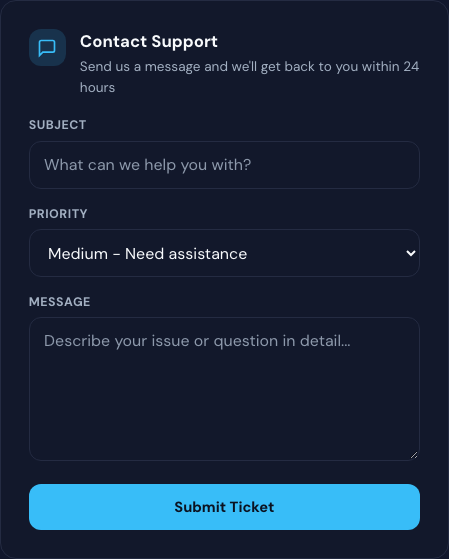
Support is a form in the app: subject, priority, and the message. Tickets go to the Email Sanitization queue. The aim is a reply within 24 hours on business days.
Contact form inside Email Sanitization
You set the subject and priority
Reply aim: within 24 hours on business days
Support · submit a ticket from the product
13
Pricing comparison
Where MailShrine sits on price
30 verification companies publish a price. Pick a list size. The order is the lowest published price first. MailShrine stays highlighted, at whatever rank the numbers give it.
UsAt 10,000 emails, MailShrine is #1 in this list — Polish · $6 for 10,000 · $0.60 per 1,000. Spot Check is 200 credits, refills every month.
31 of 31 companies
Price table · 10,000 emails
Company
Pricing
Price at this size
Free allowance
MailShrineUs
Pay as you go
Polish · $6 for 10,000 · $0.60 per 1,000
Spot Check · 200 credits, refills every month
Bulk Email Checker
Pay as you go
$0.995 per 1,000
10 checks, no account
Reoon
Pay as you go and a monthly plan
$1.19 per 1,000
20 a day, plus 100 when you register
DeBounce
Pay as you go
$1.50 per 1,000
100 credits
MyEmailVerifier
Pay as you go and a monthly plan
$1.50 per 1,000
100 a day
Bouncify
Pay as you go and a monthly plan
$2.40 per 1,000
100 credits
EmailListVerify
Pay as you go and a monthly plan
$2.70 per 1,000
100 credits
Mailercloud
Pay as you go and a monthly plan
$2.90 per 1,000
100 credits on a Mailercloud sending plan
mailfloss
Monthly plan
$2.90 per 1,000
7-day trial
BounceZero
Pay as you go
$3.00 per 1,000
100 credits
ClearBounce
Pay as you go and a monthly plan
$3.00 per 1,000
100 credits
CloudEmailVerification
Pay as you go
$3.60 per 1,000
100 credits
MillionVerifier
Pay as you go
$3.90 per 1,000
A free checker and trial packs
QuickEmailVerification
Pay as you go
$4.50 per 1,000
100 a day
Mailari
Pay as you go
$4.90 per 1,000
Trial credits
NeverBounce
Pay as you go and a monthly plan
$5.00 per 1,000
10 credits, plus a free list analysis
Clearout
Pay as you go and a monthly plan
$5.80 per 1,000
100 credits, once
Email List Validation
Pay as you go and a monthly plan
$5.90 per 1,000
100 credits
Bouncer
Pay as you go
$6.00 per 1,000
100 credits
Kickbox
Pay as you go
$7.00 per 1,000
100 credits
Hunter
Monthly plan
$7.45 per 1,000
100 verifies a month
Mailgun Validation
Monthly plan
$12.00 per 1,000
5,000 validations included on the Scale plan
ZeroBounce
Pay as you go and a monthly plan
$12.90 per 1,000
100 a month
Abstract API
Monthly plan
Starter is $19 a month for 5,000 requests ($17 a month billed yearly, $3.40 per 1,000).
100 requests a month
Elastic Email
Monthly plan
—
One email at a time on the free plan
Emailable
Pay as you go and a monthly plan
5,000 credits for $38 ($7.60 per 1,000). That is the smallest pack. Credits do not expire. A monthly plan is 15% less.
250 credits
EmailsValidator
Pay as you go
—
500 credits for 15 days
mailboxlayer
Monthly plan
—
100 requests a month
Samdos Bulk Email Verifier
Monthly plan
₦30,000 for up to 200,000 emails in 30 days (Lagos).
Competitor figures are public list prices from around September 2026. A dash means that list size is not on their published packs. MailShrine amounts are the Top up credits packs. A longer bar is a higher price per email. Click a card to read the free allowance and how the credits expire.
14
Feature comparison
27 email verification tools, on the jobs we actually do
Filter the list, or read the table. MailShrine stays highlighted. The marks are list clean, mailbox and catch-all when probing is on, typo suggestion, disposable / role / trap, Excel with original columns, a signup form, a sending-domain check, API, webhook, suite credits, and opening a campaign in Email Marketing.
UsMailShrine is the row that covers every capability in this comparison, including suite credits and a campaign handoff that opens Email Marketing without sending.
27 of 27 tools
Feature matrix
Tool
List
Mailbox
Catch-all
Typo
Risk
Excel
Signup
Domain
API
Webhook
Credits
Campaign
MailShrineUs
DeBounce
Emailable
Kickbox
MillionVerifier
QuickEmailVerification
ZeroBounce
BriteVerify
NeverBounce
Clearout
Bouncer
EmailListVerify
MyEmailVerifier
Reoon
Email Hippo
Verifalia
Bouncify
Mailgun Validation
Snov.io
Bulk Email Checker
CloudEmailVerification
Abstract API
Hunter
Mailari
Webbula
BounceZero
EmailsValidator
Yes
Partial
Not that job
Marks follow public product pages and can change. Partial means only part of that job — for example a file export that is not an Excel round-trip of your original columns, or an email widget that is not a name, phone, and bot-field signup form. Click a card to read the note. This comparison does not cover email finding, activity data, CRM auto-clean, or warmup.
15
With Email Marketing
Using MailShrine Email Marketing?
Sanitization for contacts used directly in your MailShrine Email Marketing campaigns is included. Standalone Sanitization plans are for independent list cleaning, exports, API usage, and other sanitization workflows.
Credits, the free checks, files, the signup form, your sending domain, and what happens when you open a campaign.
New accounts start with 200 credits per month. That free allowance refills every month. On a full list clean, one credit pays for one billable address. Duplicates in that list are free. An address that only fails the format check is free. A result we could not confirm — a timeout, a greylist, or a domain lookup that did not finish — is free. You are charged for a check that completed, including a domain that cannot receive mail.
The one-email check on Overview is free. The try-it sandbox on the API page is free, and it does not spend credits. Duplicates, format-only failures, and unknown results on a list are free. A full list clean spends credits on the billable addresses.
Name, phone, and email. The phone field includes a country so the number is checked with the right dialing code. The email runs the same kind of check as a list. A hidden field catches simple bots. You get a result row for each field. The sandbox checkbox on that screen stays free.
It looks up DMARC for the domain you send from, and it checks that domain against public DNS spam lists. You see the record, the policy, and whether each list says listed or not listed. It does not send mail.
Any file, or a folder of files. We read the email addresses out of what you upload, then you run the test. Paste works the same way if you do not have a file.
Yes, when the list came from a spreadsheet. Excel appears in the download menu for that job, and the file keeps the original columns plus the clean result. CSV, TXT, JSON, XML, and Markdown are available on every finished clean.
No. Start campaign in Email Marketing opens Email Marketing with the clean addresses. You still write the message and send it there. Email Sanitization does not send the campaign.
No. Sanitization for contacts used directly in MailShrine Email Marketing campaigns is included — there is no separate sanitization charge for those campaign contacts. Standalone Sanitization credits apply when you clean lists outside that campaign workflow, export cleaned lists independently, or use API and other sanitization workflows.
Open Support in Email Sanitization and submit a ticket with a subject, a priority, and a message. Tickets go to the Email Sanitization queue. The aim is a reply within 24 hours on business days. You can also email support@mailshrine.com.