
An EPP code, also called an auth code, authorization code, transfer key or AuthInfo, is the password attached to a single domain name that proves to a new registrar that the person requesting a transfer is the current holder. It is generated by your current registrar, stored at the registry, and checked by the registry when a transfer request arrives. Without the right code the transfer is refused before it starts. With it, and with the transfer lock off, a .com can move between registrars in as little as five days.
The name comes from the Extensible Provisioning Protocol, the XML-based protocol registrars use to talk to registries, defined in RFC 5730 to 5734. Every domain object in EPP carries an authInfo element. When a registrar sends a transfer request, it includes that value; the registry compares it with what is stored and either accepts or rejects. The code is not a login, does not unlock DNS, and has no use except authorising a transfer, which is why it should be treated like a one-time key rather than an account password.
MailShrine Domains shows the auth code for any domain you hold in the dashboard, once you switch off the transfer lock for that domain, and accepts auth codes from other registrars in the transfer-in flow. If a transfer into MailShrine is rejected by the losing registrar, you get a full refund. Email DNS and two free mailboxes come with the domain once it arrives.
Real-life example: Hannah's consultancy
Hannah Whitfield runs an HR consultancy in Manchester with two domains: whitfieldhr.com, registered at a US registrar four years ago, and whitfieldhr.co.uk, registered through a UK web host. She is consolidating everything at one registrar so she has one renewal, one DNS panel and one bill. The US registrar has sent her a string that looks like k7Q!2mPz#aL9vR3 and the UK host has asked her for something called an IPS tag instead.
Hannah's goals:
- Understand what the auth code is, where it lives and why one of her domains does not use one.
- Move both domains without her email going down for even an hour.
- Know what to do if a code is rejected.
Where the auth code sits
| Layer | What it holds | Who can see it |
|---|---|---|
Registry (Verisign for .com) | The authInfo value for every domain, checked on each transfer request | Registrars, through EPP |
| Losing registrar | Generates and stores the code, shows it to the registrant on request | The registrant, in the dashboard or by email |
| Gaining registrar | Receives the code from the registrant and sends it to the registry | Only during the transfer request |
| Registrant | Copies it from one dashboard to the other | You |
The registry never emails the code to anyone. If a message arrives claiming to be from "the registry" with your auth code, it is a phishing attempt.
What a valid code looks like
| Property | Typical value | Why it matters |
|---|---|---|
| Length | 6 to 32 characters; many registrars use 16 | Registries set a maximum; Verisign accepts up to 32 |
| Characters | Letters, digits and symbols such as !, #, @ | Symbols are legitimate; copy the code exactly, including trailing ones |
| Case | Sensitive | aB3 and ab3 are different codes |
| Lifetime | Until regenerated; under ICANN's revised Transfer Policy, codes are time-limited and single-use | Request a fresh code shortly before you start the transfer |
| Scope | One domain | Each domain has its own code; a portfolio of ten needs ten codes |
ICANN's rules require the losing registrar to provide the code within five calendar days of a registrant's request and forbid charging for it. A registrar that stalls, hides the button or asks for a fee is breaching its accreditation agreement.
Extensions that work differently
Not every registry uses auth codes. Hannah's .co.uk is the common example.
| Extension | Transfer mechanism | What you do |
|---|---|---|
.com, .net, .org, most gTLDs | Auth code plus transfer lock off | Copy the code into the gaining registrar |
.uk, .co.uk, .org.uk | Nominet IPS tag | Ask the losing registrar to change the tag to the gaining registrar's tag; no code |
.ng, .com.ng | Auth code | Same as gTLDs; registry is NiRA |
.ke, .co.ke | Auth code | Registry is KeNIC |
.de | AuthInfo, often time-limited to 30 days | Request shortly before the transfer |
.ca | Auth code plus CIRA registrant confirmation | Approve the email from CIRA |
.au | Password set at the registry | Retrieve from the losing registrar |
For the .co.uk, Hannah does not need a code at all. She asks the UK host to change the domain's IPS tag to the gaining registrar's tag, and the domain appears in the new account, usually within an hour.
What you need before you start
| You need | Why |
|---|---|
| Access to the losing registrar's account | The code is shown only to logged-in users; the account email must be reachable |
| Transfer lock switched off | Status clientTransferProhibited blocks the registry from accepting the request |
| The domain at least 60 days old and not transferred or re-registranted in the last 60 days | ICANN's 60-day lock applies after creation, transfer or change of registrant |
| At least 15 days before expiry | Transfers that straddle expiry can fail or trigger a renewal at the losing registrar |
| A copy of your DNS records | So the gaining registrar's zone matches the old one on day one |
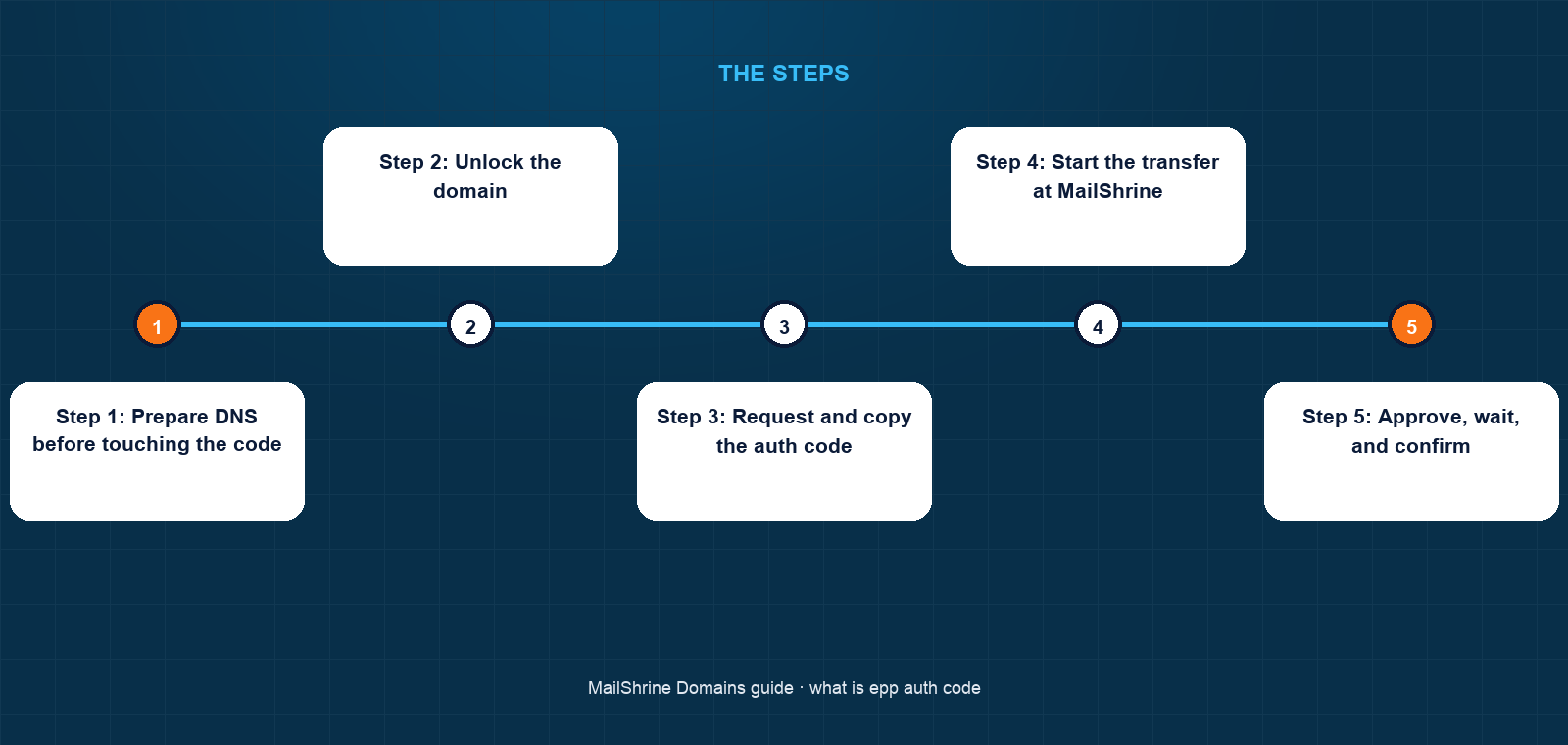
Step 1: Prepare DNS before touching the code
Hannah writes down every record on whitfieldhr.com: the A record for the site, the MX, SPF, DKIM and DMARC records for email. She recreates them in MailShrine's DNS editor in advance so that when nameservers switch, nothing changes for visitors or mail.
Step 2: Unlock the domain
In the US registrar's dashboard she turns off the transfer lock. The RDAP status changes from clientTransferProhibited to ok. The lock has protected the domain for four years; it comes off for a few days only.
Step 3: Request and copy the auth code
She clicks "Get authorization code". The registrar emails it to the registrant address, as its policy requires, within minutes. She copies it exactly, including the # and !, into a password manager rather than a chat message.
Step 4: Start the transfer at MailShrine
In the transfer-in flow she enters the domain and pastes the code. MailShrine sends the request to Verisign. The registry checks the code, confirms the domain is unlocked and older than 60 days, and sets the transfer to pending.
Step 5: Approve, wait, and confirm
The losing registrar emails her to confirm or deny. She approves, which completes the transfer immediately; had she done nothing, it would have auto-completed after five days. The domain gains a year on its expiry. For whitfieldhr.co.uk, she gives the UK host the IPS tag and the domain appears at MailShrine the same afternoon.
Hannah's checklist
- Learned that the auth code lives at the registry and is shown by the losing registrarCompleted
- Recreated all DNS records at the new registrar before unlocking anythingCompleted
- Turned off transfer lock on
whitfieldhr.comand requested a fresh codeCompleted - Entered the code at MailShrine and approved the losing registrar's emailCompleted
- Ask the UK host to change the IPS tag for
whitfieldhr.co.ukNot completed - Turn transfer lock back on for both domains once they arriveNot completed
Common mistakes
Sending the auth code over email or chat and leaving it there. Anyone with that code and a few minutes can initiate a transfer. Paste it directly into the gaining registrar and regenerate it afterwards if the transfer is abandoned.
Requesting the code before unlocking. Many registrars will not even display the code while the lock is on, and the registry will reject the request regardless. Unlock first.
Starting a transfer in the 60-day window. A domain registered, transferred or re-registranted in the last 60 days cannot move. Check the creation and updated dates in RDAP before you pay.
Letting the domain expire mid-transfer. If expiry falls inside the five-day window, the losing registrar may renew it and bill you, or the transfer may fail. Start at least two weeks out, or renew first.
Check your work
Run an RDAP lookup on the domain. Before you begin, the status should include clientTransferProhibited; after unlocking, it should not. Once the transfer is submitted, the status should show pendingTransfer. When it completes, the registrar field should name the new registrar and the expiry should be one year later than before. If the status never reaches pendingTransfer, the code was wrong, the lock was on, or the domain is inside a 60-day window.
FAQ
Is an EPP code the same as an auth code?
Yes. EPP code, auth code, authorization code, AuthInfo, transfer key and transfer secret are all names for the same per-domain password defined in the EPP protocol.
How do I get my auth code?
Log in to your current registrar, open the domain, turn off the transfer lock and look for "authorization code", "EPP code" or "transfer out". ICANN requires the registrar to provide it within five calendar days at no charge.
How long is an auth code valid?
It depends on the registrar and registry. Many codes stay valid until regenerated; some registries such as .de expire them after 30 days, and ICANN's revised Transfer Policy moves generic TLDs to time-limited, single-use codes. Request a fresh one just before you transfer.
Can someone steal my domain with the auth code?
Only if the transfer lock is also off and they can get past the losing registrar's confirmation email. That is why the code should be handled like a password and the lock left on until the day you transfer.
Why does my `.co.uk` not have an auth code?
Nominet, the .uk registry, uses IPS tags instead. Your current registrar changes the tag on the domain to the new registrar's tag, and the domain moves without a code.
Next steps
- Who Owns a Domain? Registrant, Admin and Tech Contacts Explained — the registrant whose email approves the transfer.
- Domain Lifecycle: Active, Grace, Redemption, Pending Delete — why transfers near expiry are risky.
- How Does Domain Registration Work? Registrar vs Registry vs ICANN — the EPP conversation between registrar and registry.
Citations & References
- Reference: RFC 5731: EPP domain name mapping, including authInfo
- Reference: ICANN: Transfer Policy
- Reference: ICANN: Transferring your domain name, FAQ for registrants
- Reference: Nominet: Transferring a .UK domain to another registrar
Written by Elena V., migrations editor. Elena moves domains and mailboxes between providers for a living and writes down what breaks so you can avoid it.