
Your registrar account is the control panel for everything a domain can do: its nameservers, its DNS records, its contacts, its lock, its auth code and its renewal. Every protection on the domain itself, from transfer lock to DNSSEC, can be switched off from inside that account in a few clicks. So the account is the thing that actually needs defending, and the controls that defend it are not domain-specific at all. They are the same three disciplines that protect any account that matters: a second factor that cannot be intercepted, a recovery path you control, and access that is granted to people rather than shared as a password.
Most small businesses get the first wrong by using SMS codes, the second wrong by pointing recovery at an abandoned email, and the third wrong by giving the web developer the owner login in 2021 and never taking it back.
MailShrine Domains accounts support two-factor authentication, and the two free Business Email mailboxes that come with every domain support it too, so the registrant email and the registrar login can both be behind a second factor you control. Transfer lock and WHOIS privacy are on by default, which closes the routes that do not go through the account.
Real-life example: Nadia's agency
Nadia Hussain runs a six-person marketing agency in Manchester. She holds hussaincreative.co.uk and manages eleven client domains in the same registrar account. Two former employees and one freelance developer have had the password at some point. The 2FA is SMS to her personal mobile. She has just read about SIM-swap fraud and is not sleeping well.
Nadia's goals this week:
- Put a second factor on the account that a phone-shop employee cannot defeat.
- Make sure losing her phone, her laptop or her email does not lock her out permanently.
- Give staff and clients the access they need without handing anyone the keys to every domain.
The three layers
| Layer | Weak version | Strong version | What it stops |
|---|---|---|---|
| Authentication | Reused password, SMS code | Unique 20+ character password in a manager, authenticator app or hardware key | Phishing, credential stuffing, SIM swap |
| Recovery | Recovery email on an old free account; phone number as recovery | Recovery email on a mailbox with its own 2FA, backup codes stored offline | Account reset via a compromised inbox |
| Access | One owner login shared by everyone | Per-person logins, delegated roles for DNS-only or billing-only, revoked on departure | Ex-staff and ex-agencies retaining control |
An attacker needs to defeat only one layer that is weak. Nadia's account today has all three weak, which is normal and fixable in an afternoon.
Why SMS is the wrong second factor
An SMS code proves possession of a phone number, and phone numbers are controlled by carriers, not by you. In a SIM swap, an attacker convinces or bribes a carrier employee to move your number to their SIM. From that moment every SMS code lands on their phone. The attack is routine in the UK, the US, Nigeria and South Africa, and it is aimed at exactly the people who hold valuable domains and crypto accounts.
An authenticator app (TOTP) generates codes on the device from a shared secret; there is no network to intercept. A hardware security key goes further and also defeats phishing, because the key signs a challenge bound to the real site's address and will not respond to a lookalike. For a registrar account, either is a large step up from SMS, and SMS should remain only as a last-resort recovery method, if at all.
What you need before you start
| You need | Why |
|---|---|
| A password manager | Unique passwords for registrar, registrant email and recovery email |
| An authenticator app (or a hardware key) | TOTP codes that cannot be SIM-swapped |
| A safe place for backup codes | Printed and stored offline, or in the password manager's secure notes |
| A list of everyone who has ever had the login | So you can revoke rather than guess |
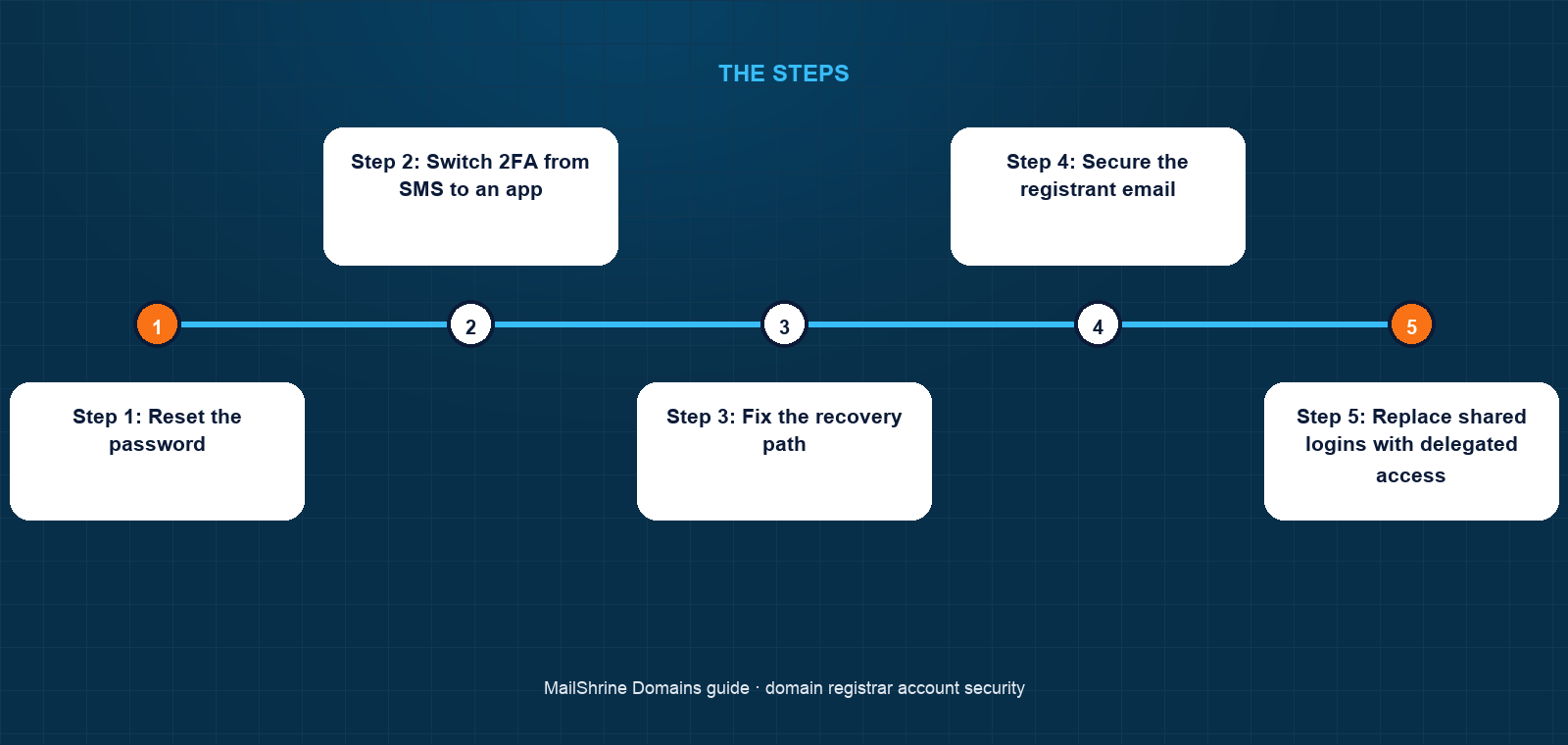
Step 1: Reset the password
Generate a long random password in your manager and change it on the registrar account. This alone invalidates every copy held by former staff and contractors.
Step 2: Switch 2FA from SMS to an app
In the account's security settings, enable authenticator-app 2FA, scan the QR code, confirm a code, then remove SMS as a second factor if the registrar allows it. Save the backup codes the registrar shows you. Those codes are what get you back in if your phone is lost; without them, recovery depends on support agents and identity documents and can take days.
Step 3: Fix the recovery path
Check the recovery email on the account. It must be a mailbox you still use, with its own 2FA, and ideally not the same mailbox as the registrant email. Remove any recovery phone number that could be SIM-swapped, or accept the risk consciously if the registrar requires one.
Step 4: Secure the registrant email
Open the mailbox that receives registrar notices. Turn on 2FA. Check for forwarding rules or connected apps you did not add. If it is a MailShrine mailbox, 2FA is in the mailbox settings. If it is a personal account, consider moving the registrant contact to a business mailbox that will outlive any one employee.
Step 5: Replace shared logins with delegated access
Where the registrar supports it, create separate logins or roles for staff, limited to what they need: DNS editing for the developer, billing for the bookkeeper, nothing for anyone who has left. Where it does not, keep the owner login with the owner only and handle DNS changes by request. For client domains, the cleanest model is a client-owned account with the agency delegated in, so a parting of ways does not require a transfer.
Step 6: Review quarterly
Every three months, read the account's active sessions and login history, check the list of people with access, and confirm the recovery email still works. Ten minutes.
Nadia's checklist
- Changed the registrar password to a 24-character random stringCompleted
- Enabled authenticator-app 2FA and removed SMSCompleted
- Printed backup codes and put them in the office safeCompleted
- Moved the recovery email from an old Hotmail address to
security@hussaincreative.co.ukwith 2FA onNot completed - Created a DNS-only role for the freelance developer and revoked the two ex-employeesNot completed
- Began moving the eleven client domains into client-owned accounts with agency delegationNot completed
Common mistakes
Keeping SMS as a fallback "just in case". If SMS can reset the account, the account is only as secure as SMS. Remove it or treat the number as a secret.
Storing backup codes in the same email account they protect. If the inbox is compromised, so are the codes. Offline or in the password manager.
Making the registrant email an address on the domain with no 2FA. If the domain is hijacked, the inbox goes with it, and with it your ability to recover. Protect that mailbox or use an outside one.
Letting the agency own the account. When the agency closes or the relationship sours, you are negotiating for your own domain. Own the account; delegate the work.
Never testing recovery. Discover that the recovery email bounces now, not during an incident.
Check your work
Log out and attempt to sign in on a different device. It should require the password and a code from your app, not a text. Then attempt the "forgot password" flow and stop at the point where it tells you where the reset link will go: that destination should be a mailbox with its own 2FA that you checked this week. Finally, list every person who can log in and confirm each is current. If those three pass, the account is harder to take than the domain is worth to most attackers.
FAQ
What is the difference between account 2FA and transfer lock?
The transfer lock is a flag on the domain at the registry that blocks outside transfer requests. Account 2FA protects the login that can remove the flag. The lock without 2FA is a door with a bolt and the key under the mat.
Should I use a hardware security key for my registrar account?
If the registrar supports it and your domains carry payments or logins, yes. A key defeats phishing in a way an authenticator app does not. For most small businesses an authenticator app is proportionate.
What happens if I lose my phone with the authenticator app?
Use the backup codes the registrar issued when you set up 2FA. Without them, you go through the registrar's identity-verification process, which typically needs government ID matching the registrant details and can take days.
Can I give my developer access without sharing my password?
Many registrars offer sub-accounts or delegated roles with limited permissions. If yours does not, keep the owner login private and make DNS changes on the developer's instruction, or move to a registrar that supports delegation.
Does MailShrine support two-factor authentication?
Yes, on the account and on every Business Email mailbox, including the two free mailboxes that come with each domain. Enable both so the registrant email and the registrar login are each behind a second factor.
Next steps
- How to Stop Domain Hijacking — how the account fits into the full picture of attack routes.
- Domain Lock / Transfer Lock: What It Protects Against — the registry-side flag your account controls.
- What Happens If Someone Steals Your Domain: Recovery Steps — what to do if the account was breached before you read this.
Citations & References
- Reference: NIST SP 800-63B: Digital Identity Guidelines, Authentication and Lifecycle Management
- Reference: ICANN SSAC: SAC007 Domain Name Hijacking report
- Reference: RFC 6238: TOTP, Time-Based One-Time Password Algorithm
- Reference: FBI: SIM swapping public service announcement
Written by Daniel O., security editor. Daniel covers the locks, keys and recovery paths that keep a domain in the hands of the person who paid for it.