
Transferring a domain into MailShrine moves the registrar record for a name you already own from your current registrar to MailShrine, without changing who owns it and without the name ever going offline. You pay for one year of renewal as part of the transfer, that year is added on top of whatever time is already left, and when the transfer completes the domain lands in your dashboard with WHOIS privacy and transfer lock already on. If the transfer is rejected for any reason, the charge is refunded in full.
The process is governed by ICANN's Transfer Policy, which is why every registrar's version looks the same: unlock, get the auth code, start the transfer at the new registrar, approve, wait up to five days. This guide maps those steps onto the Transfer tab at /dashboard/domains and explains what to do about DNS and email so nothing breaks in the middle.
MailShrine Domains accepts transfers for 150+ extensions, routing them to Openprovider or Dynadot. Once a domain arrives, it gets the same Anycast DNS, DNSSEC switch and two Business Email mailboxes as a fresh registration. The transfer section on the product page is at /products/domains#dom-transfer.
Real-life example: Tomasz's consultancy
Tomasz Nowak runs a two-person data consultancy in Berlin. His domain nowakdata.com has sat at a large registrar for four years, where privacy costs extra and the email forwarding has dropped messages twice this quarter. He wants the domain, DNS and mail in one place. His worry is the one everyone has: will my clients' emails bounce while the domain is between registrars?
Tomasz's goals this week:
- Move
nowakdata.comto MailShrine without a minute of email downtime. - Understand what the transfer costs and what happens to the 14 months already left on the registration.
- Know the exact moment it is safe to switch nameservers and start using MailShrine's mailboxes.
What a transfer changes, and what it does not
| Item | Changes during transfer? | Why |
|---|---|---|
| Registrar of record | Yes, from the old registrar to MailShrine | This is the whole point of the transfer |
| Registrant (owner) | No | A transfer is not a change of ownership |
| Expiry date | Extended by one year | ICANN requires the gaining registrar to add a year; existing time is kept |
| Nameservers | No, unless you change them | The registry copies the current nameservers as they are |
| DNS records | No, if nameservers stay | Records live wherever the nameservers point, not at the registrar |
| No, if nameservers stay | MX records continue to resolve from the old DNS host |
The last three rows are what keep Tomasz online. The transfer moves the record of who the registrar is; it does not move the DNS zone. As long as the old nameservers keep answering, email and the website keep working through the entire five-day window.
Eligibility: the rules the registry enforces
Before you start, the domain must pass four checks that MailShrine's Transfer tab runs for you:
- Registered or last transferred more than 60 days ago. ICANN's Transfer Policy imposes a 60-day lock after creation and after any inter-registrar transfer.
- Not within 60 days of a registrant change at registrars that apply the optional lock after a change of owner.
- Status not clientTransferProhibited. This is the transfer lock at your current registrar. You turn it off there.
- Not expired, pending delete or in redemption. Transfers of expired names often fail or complete with surprising results; renew at the old registrar first if expiry is within a week.
Country-code extensions have their own rules. Some, like .de, use an auth code the same way; others, like .uk, use a "push" to the gaining registrar's tag instead. The Transfer tab tells you which applies when you enter the name.
What you need before you start
| You need | Why |
|---|---|
| Login to your current registrar | To unlock the domain and request the auth code |
| The auth code (EPP code, transfer key) | The registry will only accept a transfer that carries the correct code |
| Access to the registrant email address | ICANN requires the gaining registrar to get approval from the registrant; the approval email goes there |
| WHOIS privacy off, or your registrar's forwarding working | At some registrars, privacy hides or rewrites the registrant email, which can block the approval message |
| One year's renewal fee | Charged at the start, refunded in full if the transfer is rejected |
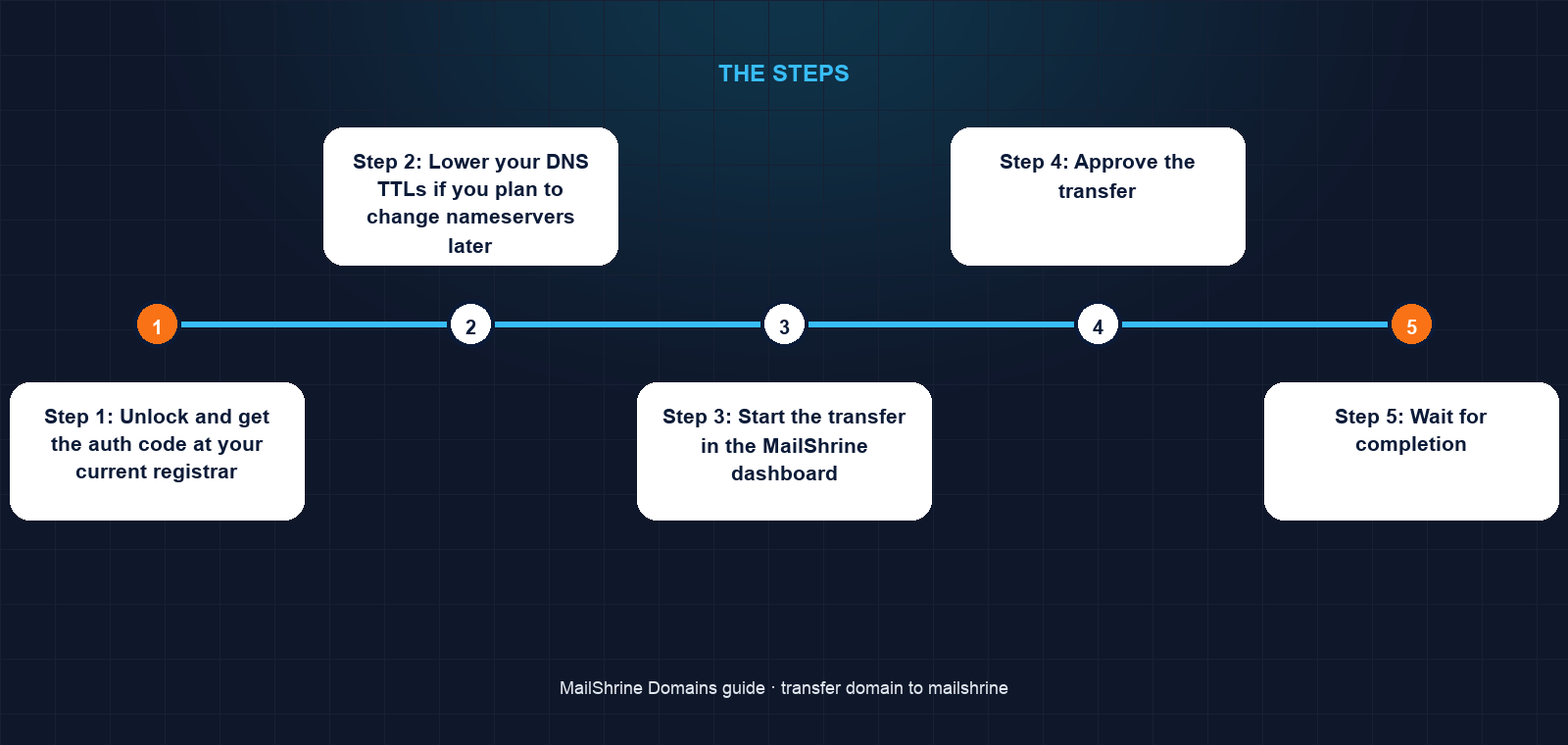
Step 1: Unlock and get the auth code at your current registrar
Log in to the current registrar, open the domain, and turn off transfer lock (it may be called "domain lock" or "registrar lock"). Then request the auth code. Some registrars show it on screen; others email it to the registrant address, often with a short delay. Copy it exactly; it is case sensitive and usually 8 to 32 characters.
Step 2: Lower your DNS TTLs if you plan to change nameservers later
If you intend to move DNS to MailShrine after the transfer, lower the TTL on your current A, CNAME and MX records to 300 seconds now. This makes the later nameserver switch propagate in minutes. Do not change nameservers yet.
Step 3: Start the transfer in the MailShrine dashboard
Go to /dashboard/domains, click the Transfer tab, enter nowakdata.com and paste the auth code. The tab checks eligibility and shows the price: one year's renewal at the normal rate. Pay by Stripe or Paystack. The transfer appears in the Orders tab with status Pending transfer.
Step 4: Approve the transfer
ICANN's Transfer Policy gives the losing registrar up to five calendar days to release the domain. Two emails can shorten that. MailShrine sends the registrant an approval request; click Approve. Your old registrar may also send a message offering to approve or cancel; approving there releases the domain immediately rather than waiting out the five days. Ignore the old registrar's "are you sure you want to leave" marketing in that same message.
Step 5: Wait for completion
Watch the Orders tab. When the registry moves the record, the status becomes Active and the domain appears under My domains with privacy and lock on, the expiry extended by a year, and the nameservers exactly as they were. Nothing has changed for your clients yet.
Step 6: Move DNS and email when you are ready
Open the domain under My domains. Because the nameservers are still the old ones, the DNS editor shows a notice that its records are not in use. Copy any non-mail records you need (A, CNAME, TXT verifications) into the editor first. Then click Nameservers and switch to MailShrine's. The mail records for the two included mailboxes are already in the zone. Within the lowered TTL, email begins arriving at MailShrine. Finally, after a day, you can cancel the old registrar's email forwarding and let the old account lapse.
Tomasz's checklist
- Confirmed
nowakdata.comwas last transferred more than 60 days agoCompleted - Unlocked the domain and copied the auth code at the old registrarCompleted
- Lowered TTLs on the current DNS records to 300Completed
- Started the transfer in the Transfer tab and paid one year's renewalCompleted
- Approved from the registrant inbox and again at the old registrar to skip the five-day waitCompleted
- Copied the website A and CNAME records into the MailShrine DNS editorNot completed
- Switched nameservers to MailShrine and sent a test email to the new mailboxNot completed
Common mistakes
Changing nameservers before the transfer completes. The transfer does not need it, and if you switch early to MailShrine's nameservers without the website records copied over, your site goes dark. Transfer first, DNS second.
Letting the domain expire during the transfer. Transfers of expired names behave differently at each registry and can fail or restore a year you then pay for twice. If expiry is within a week, renew at the old registrar first; the transfer still adds another year.
Leaving WHOIS privacy on where it hides the registrant email. Some privacy services do not forward the transfer approval. Turn privacy off for the few days of the transfer, or make sure the forwarding address is one you read.
Pasting the auth code with a trailing space. Codes are matched exactly. If the Transfer tab reports an invalid code, request a fresh one; many registrars rotate codes after each request.
Assuming the one-year fee is extra cost. It is a renewal. The year is added to your expiry date, and if the transfer is rejected you get it back in full.
Check your work
Under My domains the domain should show Active, an expiry date one year later than before, privacy and lock on, and the nameservers unchanged until you decide otherwise. A public RDAP lookup for the domain should name MailShrine's registrar partner as the sponsoring registrar. Send an email to an address on the domain; it should arrive wherever it did before, because DNS has not moved yet. If the status is still Pending transfer after five full days, the old registrar has not released it; contact support with the order number.
FAQ
How long does a transfer into MailShrine take?
Anywhere from a few minutes to five days. The registry allows the losing registrar up to five calendar days to respond. If you approve the transfer at your old registrar as well as at MailShrine, most complete within an hour.
Will my email stop working during the transfer?
No, as long as you leave the nameservers alone. DNS and MX records resolve from wherever the nameservers point, which does not change during a transfer. Move DNS afterwards, with TTLs lowered first.
What does the transfer cost?
One year of renewal at the normal price for the extension, for example $12.99 for a typical .com. That year is added to your existing expiry. If the transfer is rejected, the full amount is refunded.
My domain was registered 40 days ago. Can I transfer it?
Not yet. ICANN's Transfer Policy blocks inter-registrar transfers for 60 days after registration and after any previous transfer. The Transfer tab tells you the date it becomes eligible.
Do I keep my existing time on the domain?
Yes. The registry keeps the remaining months and adds one year on top. Tomasz's 14 months become 26 months after completion.
Next steps
- Add DNS Records in the MailShrine Dashboard — recreate your website records before switching nameservers.
- Switch Your MailShrine Domain to Another Email Provider — if you want to keep Google Workspace or Outlook after the move.
- Get Your Auth Code and Transfer Out of MailShrine — the same process in reverse, should you ever need it.
Citations & References
- Reference: ICANN: Transfer Policy
- Reference: ICANN: Transferring your domain name (registrant FAQ)
- Reference: RFC 5730: Extensible Provisioning Protocol (EPP)
- Reference: ICANN: RDAP lookup
Written by Elena V., migrations editor. Elena writes about moving domains and mail between providers in the order that keeps everything online.