Alex at Summit Leads Co sells event follow-up for B2B conference sponsors. She needs a send-ready email list built from live harvest, not a bought file that bounces. This guide walks the MailShrine AI Email Lead Generator workflow: define ICP → discover outreach contacts through live prospecting → sanitize → segment → send.
Related: How to Build a B2B Email List · How to Build a Cold Email List from Scratch · ICP Targeting for Email Lead Generation · What Is an AI Email Lead Generator?.
Real-life example: Summit Leads Co
Alex exported 400 rows from a static database — 11% hard bounces on the first send. She switched to live harvest with product intel and ICP keywords. After Email List Hygiene, bounce dropped under 2% and reply rate tripled.
Quick comparison: bought list vs live harvest list building
| Approach | Data freshness | ICP fit | Bounce risk | MailShrine path |
|---|---|---|---|---|
| Bought email list | Months–years old | Generic titles | High | Avoid — see Bought List vs Fresh Leads |
| Static database export | Cached contacts | Filter-based | Medium | Supplement with live harvest |
| Live harvest + sanitize | Live signals today | Product-aware | Low | Open AI Email Lead Generator → |
What you need before you start
| Item | Why you need it |
|---|---|
| Product intel | Agents need offer context — Product Intel Guide |
| ICP sentence | Role + pain + search behavior — ICP for Email Leads |
| MailShrine account | Sign in |
| Sanitize tools bookmarked | Email List Cleaner · Bulk Email Validator |
Step 1: Define who belongs on the list
Write one sentence: who buys, what pain, what they search. Paste into product intel Analyze or add as audience chips.
For Summit Leads Co: "Alex targets buyers who search for solutions like event follow-up for B2B conference sponsors — not generic 'business owner' lists."
Use ICP Builder from Product to draft chips if you are stuck.
Step 2: Build or refine harvest targeting
Add 4–8 audience chips and 10–20 Google-style keywords — category intent, not your trademark. See Google-Style Keywords for Lead Harvesting.
Avoid chips like "everyone in tech." Agents interpret breadth as noise and burn credits on off-ICP rows.
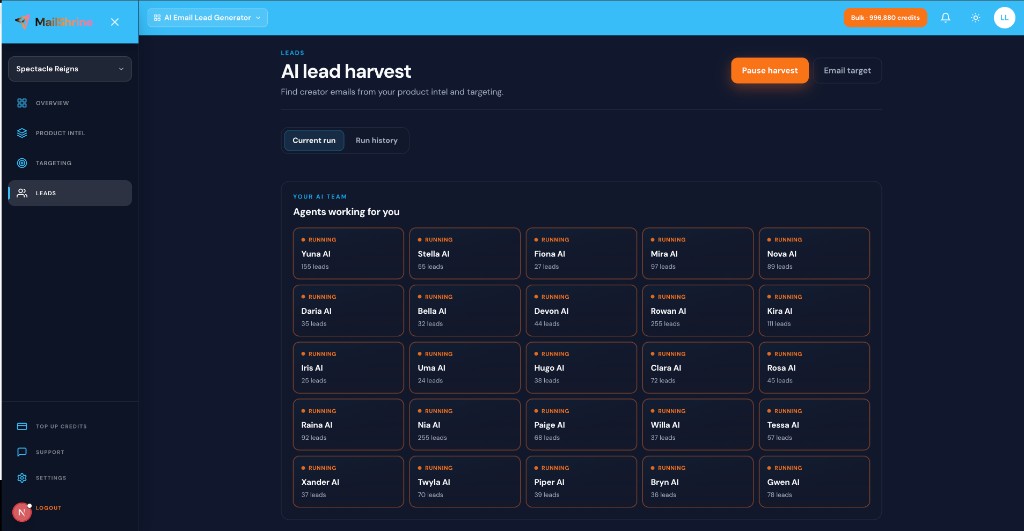
Step 3: Live harvest with an email target
- Set email target 100–200 for first test — Email Target Delivery.
- Let 25 AI agents run parallel prospecting — AI Agents for Lead Generation.
- Export CSV when target hits — Export Leads CSV & Excel.
Step 4: Sanitize before send
Run the export through MailShrine list quality tools:
- Duplicate Email Remover — multi-source dupes.
- Email List Cleaner — invalids and disposables.
- Bulk Email Validator — syntax and risk flags.
- Role-Based Email Filter — strip info@ and support@ if selling to named buyers.
- Catch-All Risk Screener — flag risky domains.
- Suppression List Merger — merge unsubscribes and bounces.
Suite flow: harvest → sanitize → send on one login — How AI Lead Generation Works.
Step 5: Segment and map for your sequencer
Split tiers with Email List Splitter. Map columns via CSV Column Mapper for Instantly, Lemlist, or Smartlead.
Score fit: Lead Quality Scorecard · ICP Fit Score Calculator.
Alex's finished checklist
- One-sentence ICP writtenCompleted
- Product intel analyzed from URLCompleted
- Test a 150-contact prospecting run — manual spot-check passedCompleted
- List cleaned with Email List Cleaner + Bulk ValidatorCompleted
- Scale harvest to 500 with same targetingNot completed
- Merge suppression list before sequence 2Not completed
Common mistakes to avoid
- Buying a list to "save time" — stale emails destroy domain reputation. Build fresh with live harvest.
- Skipping sanitize — even good harvests pick up dupes and role accounts.
- Brand keywords only — finds fans and competitors, not buyers searching category terms.
- One giant segment — tier ICP bands get higher reply rates; see Segment Leads by ICP.
- No suppression merge — re-emailing unsubscribes triggers complaints.
Check your work
- Can you state ICP in one sentence without jargon?
- Did bounce rate stay under ~3% after validation?
- Are keywords problem/solution searches, not your product name?
- Is every row traceable to a harvest run for compliance? — Document Lead Sources
Frequently asked questions
How many emails should my first list include?
Start 100–200 verified rows to test messaging. Scale after reply rate and bounce benchmarks look healthy.
Can I combine harvest with a CSV I already have?
Yes — dedupe with Duplicate Email Remover, then sanitize the merged file. Prefer live harvest for net-new contacts.
Do I need a separate verification subscription?
MailShrine list quality tools handle pre-send hygiene. Heavy SMTP verification may still help for catch-all-heavy lists.
How often should I rebuild the list?
B2B lists decay ~2–3% monthly — List Decay Estimator. Re-harvest quarterly or when bounce spikes.
Next steps
- How to Build a B2B Email List — firmographic list building playbook.
- Email List Hygiene Checklist — full sanitize gate before send.
- Product URL to Lead List Workflow — end-to-end harvest pipeline.
Citations & References
- Reference: FTC CAN-SPAM compliance guide
- Reference: HubSpot: email list building basics
Written by Diana P., CSV Enrichment Ops.