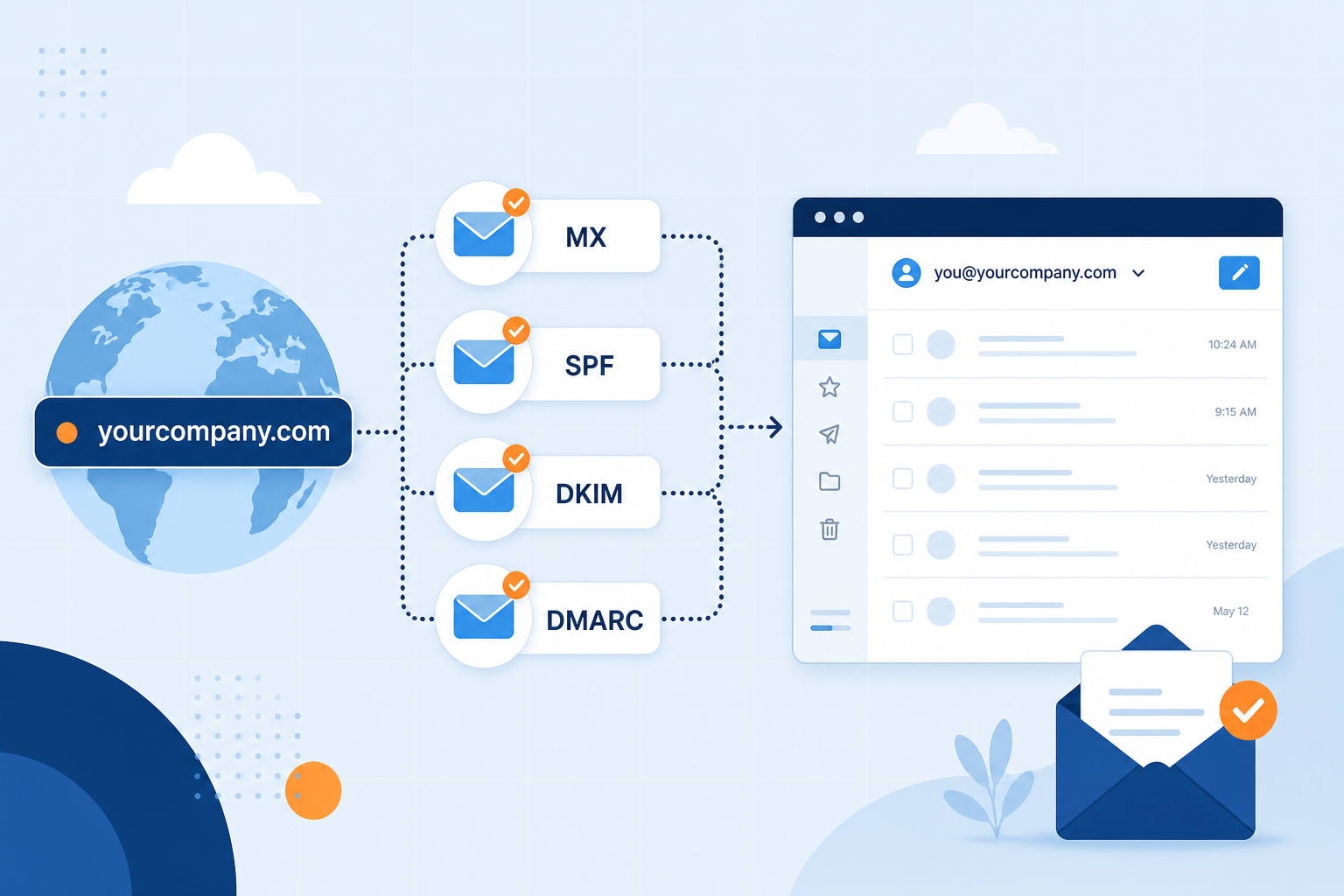
Business email is email that uses a domain your business owns — for example you@yourcompany.com — instead of a free personal address like you@gmail.com. Every reply shows your brand, not a consumer mailbox provider.
This guide explains what business email is, what you need to run it, and how MailShrine Business Email gives you professional mailboxes without buying a whole productivity suite. When you are ready to click through setup, follow How to Set Up Business Email or How to Create a Custom Domain Email.
Real-life example: FixRight Plumbing
Chinedu runs FixRight Plumbing from Ikeja. His Instagram and WhatsApp look sharp, but quotes still go out from fixrightchinedu@gmail.com. One commercial client asked if he had a “real company email” before signing a maintenance contract.
Chinedu’s goal this week:
- Understand what business email actually is (and is not).
- Pick addresses like
chinedu@fixright.ngandjobs@fixright.ng. - Know the pieces he must buy: domain + email host — not necessarily a new website.
Business email in one table
| Term | Plain meaning | Example |
|---|---|---|
| Domain | The brand name after @ | fixright.ng |
| Business email / professional email | Mail address on that domain | chinedu@fixright.ng |
| Email hosting | The service that stores mail and shows DNS to publish | MailShrine Business Email |
| Personal free mail | Consumer address on someone else’s domain | fixrightchinedu@gmail.com |
You can have a website, online store, or no website at all. Business email only requires a domain you control and an email host.
What you need before you start
| Item | Why you need it |
|---|---|
| A domain you control | Bought at Namecheap, Cloudflare, GoDaddy, etc. |
| DNS login | To publish MX / SPF / DKIM / DMARC when the host asks. |
| An email host | MailShrine creates mailboxes and aliases on that domain. |
| About 20–40 minutes | Plus waiting while DNS propagates. |
Step 1: Separate “email product” from “productivity suite”
People say “business Gmail” when they mean Google Workspace — Gmail’s interface on your domain, plus Docs, Drive, and Meet, billed per user.
Business email hosting (like MailShrine) focuses on mailboxes, aliases, webmail, and IMAP/SMTP. You still look professional as you@company.com without paying for a full suite you may never open.
| Need | Typical fit |
|---|---|
| Only professional inboxes + aliases | Business email host |
| Live Docs/Sheets collaboration every day | Full suite (Workspace / Microsoft 365) |
| Marketing newsletters to thousands | MailShrine Email Marketing (different job from day-to-day mail) |
Step 2: Own the domain (the brand after @)
- Choose a domain customers can spell:
fixright.ngorfixrightplumbing.com. - Register it at a registrar you trust.
- Confirm you can edit DNS (Advanced DNS / DNS management).
Owning the domain means you can change email hosts later and keep the same addresses. With free Gmail, the brand after @ is never yours.
Step 3: Choose how addresses should look
| Pattern | Example | Use |
|---|---|---|
| Name mailbox | chinedu@fixright.ng | Founder identity |
| Role alias | jobs@, hello@ | Public forms without sharing a password |
| Team mailbox | dispatch@ | Separate ownership when volume grows |
Aliases keep seat costs down. See address patterns again in Custom Domain Email.
Step 4: Connect the domain to an email host
- Sign in to MailShrine (or register).
- Open Business Email → Domains → add
fixright.ng. - Publish the MX + authentication records shown for your workspace.
- Wait until status is Verified.
Website A / CNAME records can stay pointed at your current site host. Email uses MX and mail TXT — different records. Details: Domain vs Email Hosting.
Step 5: Create mailboxes and prove delivery
- Mailboxes → create
chinedu@fixright.ng. - Add alias
jobs@fixright.ngif needed. - Open webmail → send to a personal Gmail → reply back.
If verification is slow, read How Long Does Business Email DNS Setup Take?.
Step 6: Put the address everywhere customers look
Update Instagram bio, invoices, Google Business Profile, website forms, and WhatsApp business profile. Tell regular clients once: “Please use jobs@fixright.ng going forward.”
Chinedu’s finished plan (checklist)
- Understands business email = domain + email hostCompleted
- Domain
fixright.ngready at registrarCompleted - Decided on
chinedu@mailbox +jobs@aliasCompleted - Chose MailShrine for email-first hostingCompleted
- DNS published + verified (tonight)Not completed
- Round-trip test from webmailNot completed
Common mistakes to avoid
- Thinking website hosting automatically includes good business email — often weak or missing on modern static hosts.
- Using
companyname@gmail.comforever — fine for experiments; painful for invoices and partnerships. - Buying Workspace “just for the Gmail look” when you only needed mailboxes — see Do You Need Google Workspace Just for Email?.
- Changing A records while fixing email — can take the site offline.
Check your work
- Can you explain business email in one sentence? (Mail on a domain you own.)
- Do you own DNS for that domain?
- Have you picked mailbox vs alias roles?
- Is an email host chosen (MailShrine)?
Next steps
- How to Set Up Business Email — click-by-click dashboard path.
- Business Email vs Personal Gmail — when to leave free mail.
- Best Business Email for Small Business — buyer checklist.
Citations & References
- Reference: Google: Email sender guidelines
- Reference: ICANN: What is DNS?
Written by Isabelle M., Business Email Specialist. Isabelle helps founders understand professional email before they touch DNS.