
Short answer: you need business email on your domain. You do not automatically need Google Workspace if you mainly want you@yourcompany.com, webmail, and maybe Outlook/iPhone via IMAP.
Google Workspace is a full suite (Gmail interface + Drive + Docs + Meet) priced per user. MailShrine Business Email is built for professional mailboxes and aliases without forcing the whole suite.
Real-life example: RideLagos Dispatch
Omar runs a three-person dispatch team. They already chat on WhatsApp and share sheets in free consumer Google accounts. A consultant told him he “must buy Workspace” before he can have ops@ridelagos.com.
Omar’s questions:
- Is Workspace required for custom domain email?
- What does he pay for if the team never opens Docs?
- Can MailShrine cover mail while they keep free tools elsewhere?
Workspace vs email-first host
| Question | Google Workspace | MailShrine Business Email |
|---|---|---|
| Custom domain email | Yes | Yes |
| Familiar Gmail UI | Yes (core pitch) | Webmail + IMAP into apps you like |
| Docs / Drive / Meet included | Yes | No — bring your own tools |
| Price shape | Per-user suite | Mailbox-focused plans (Free → Business) |
| Best when | Team lives in Google all day | You mainly need professional mail |
What you need either way
| Item | Role |
|---|---|
| Domain | Brand after @ |
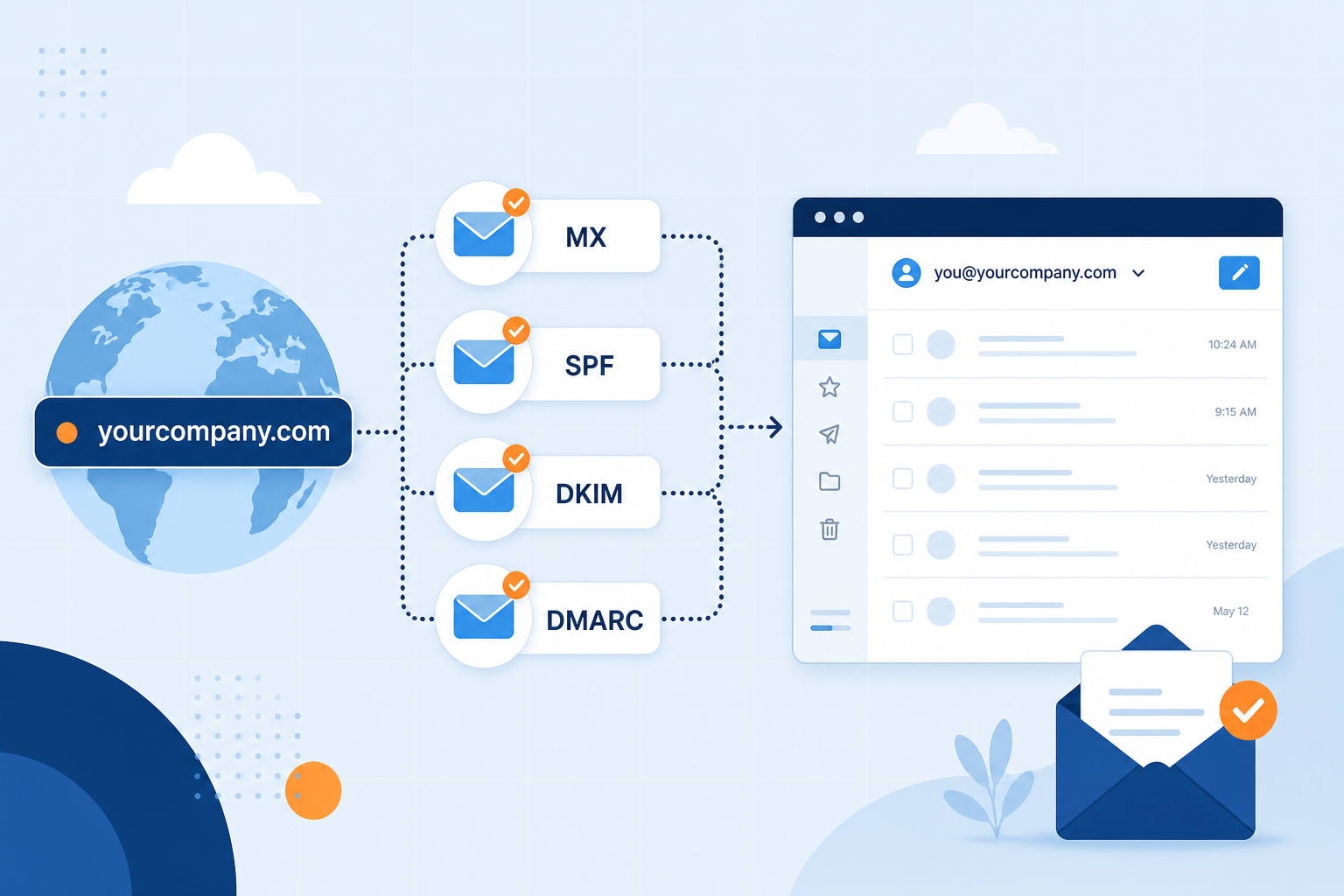
| DNS edits | MX + SPF + DKIM + DMARC |
| Mail host | Workspace or MailShrine or Microsoft 365, etc. |
Step 1: List the apps you actually use weekly
If the team already uses WhatsApp + Notion + Sheets casually and only needs branded mail, a suite is optional.
If everyone lives in Docs comments and Google Meet daily, Workspace may still be worth it — just know you are buying collaboration, not “the only way to get email.”
Step 2: Count seats honestly
Suites bill per user. Aliases like billing@ on Workspace are often free, but each human mailbox is a seat.
On MailShrine, plan around how many mailboxes you need; use aliases for public role addresses (custom domain guide).
Step 3: If you only need email — connect MailShrine
- Sign in → Business Email → add domain.
- Publish DNS records from the dashboard.
- Create mailboxes + aliases.
- Test send/receive in webmail (full setup).
You can still open the mailbox inside the Gmail mobile app via IMAP if you prefer that UI — the domain stays yours.
Step 4: If you choose Workspace anyway
Buy Workspace, verify the domain, activate Gmail MX, and create users. That is valid business email — you simply pay for the suite. Return here later if you downscope to email-only hosting.
Step 5: Avoid “free forwarding” as a fake substitute
Cloudflare Email Routing + “send as” hacks can look like Workspace for $0. Fine for experiments; fragile for teams (revoking access, audit, calendars). Prefer a real mailbox host when customers depend on you.
Omar’s decision checklist
- Team does not need Workspace Docs dailyCompleted
- Needs
omar@,ops@,support@onridelagos.comCompleted - Chose MailShrine for mailboxes + aliasesCompleted
- Understood Workspace is optional for domain emailCompleted
- DNS verification completeNot completed
- Drivers informed of new reply-from addressNot completed
Common mistakes to avoid
- Equating “Gmail” with “free @gmail.com on my domain.”
- Paying for unused Drive/Meet seats.
- Mixing personal free Google logins for company records.
- Skipping SPF/DKIM/DMARC on any host you pick.
Check your work
- Written list: suite features you will use weekly.
- Seat count vs alias plan.
- Email host selected with eyes open.
- Domain verification path booked on the calendar.
Next steps
- Business Email vs Personal Gmail
- Best Business Email for Small Business
- How Much path via full setup walkthrough
Citations & References
- Reference: Google: Email sender guidelines
- Reference: ICANN: What is DNS?
Written by Elena R., Business Email Specialist. Elena helps teams choose between full productivity suites and email-first hosts.