YouTube creators often publish a business inquiry email on their channel About page — the official path for sponsorships, affiliate deals, and product reviews. Finding those addresses at scale means combining manual About-tab checks with keyword-led live harvest so you reach creators who are actively posting in your niche today.
MailShrine AI Email Lead Generator uses product intel and ICP keywords to build outreach lists of YouTube creators who match your ICP, then delivers CSV or Excel when your email target is met. Pair with Creator Fit Scorer before pitching.
Related: How to Find Creator Emails · Podcast Host Email Outreach · Product URL to Lead List Workflow.
Real-life example: DeskFlow Ergonomics
Nina sells an adjustable desk mat for remote workers. She manually checked 15 tech YouTube channels — slow, and half hid email behind management firms. She needed home-office and WFH setup reviewers with 20K–500K subs who posted in the last 60 days.
DeskFlow’s MailShrine run:
- Intel from
deskflow.com+ ergonomics whitepaper PDF. - Keywords: “best standing desk setup 2026,” “home office tour WFH,” “ergonomic desk review.”
- Audience: “productivity YouTubers,” “remote work setup channels.”
- Email target 180, Excel to inbox.
Live prospecting surfaced business contacts from About pages, linked media kits, and creator sites tied to those keywords — not a generic “tech YouTuber” dump.
Where YouTube business emails live
| Location | What you find | Access |
|---|---|---|
| Channel About → View email address | Official business inquiry (logged in) | Manual per channel |
| Channel description links | Media kit, “work with me” page | Follow outbound link |
| Video description | Sometimes business@ or agency email | Per-video |
| Linked website | Contact or partnerships page | Crawl footer |
| Live harvest trails | Business contacts on published pages agents find via keywords | Automated at scale |
YouTube may hide the address behind a click — agents still follow public pages creators link from the channel ecosystem.
Manual vs live harvest for YouTube emails
| Approach | Best for | Limit |
|---|---|---|
| Manual About tab | Dream list of 10–25 channels | Does not scale |
| VA spreadsheet | Mid-size campaigns | Stale in weeks |
| Static YouTube creator DB | Quick but risky | Bounce + wrong niche |
| MailShrine live harvest | 100–500 on-ICP creators | Needs good keywords |
Compare data models: Live Harvest vs Static Lead Databases.
Step 1: Define YouTube creator ICP
Be specific about content format, not just subscriber count:
| Dimension | Example for DeskFlow |
|---|---|
| Sub range | 20K–500K |
| Content | Desk tours, WFH productivity |
| Geo | US/UK/CA English |
| Post frequency | Upload in last 45 days |
| Brand safety | No gambling adjacent |
Load this into product intel audience chips before harvest.
Step 2: Build keywords creators’ audiences actually search
YouTube SEO titles reflect what viewers type — mirror that in harvest keywords:
- “best budget standing desk”
- “home office makeover small apartment”
- “ergonomic chair and desk combo review”
Avoid only “DeskFlow” — that finds existing mentions, not new partners.
Step 3: Set email target and inbox delivery
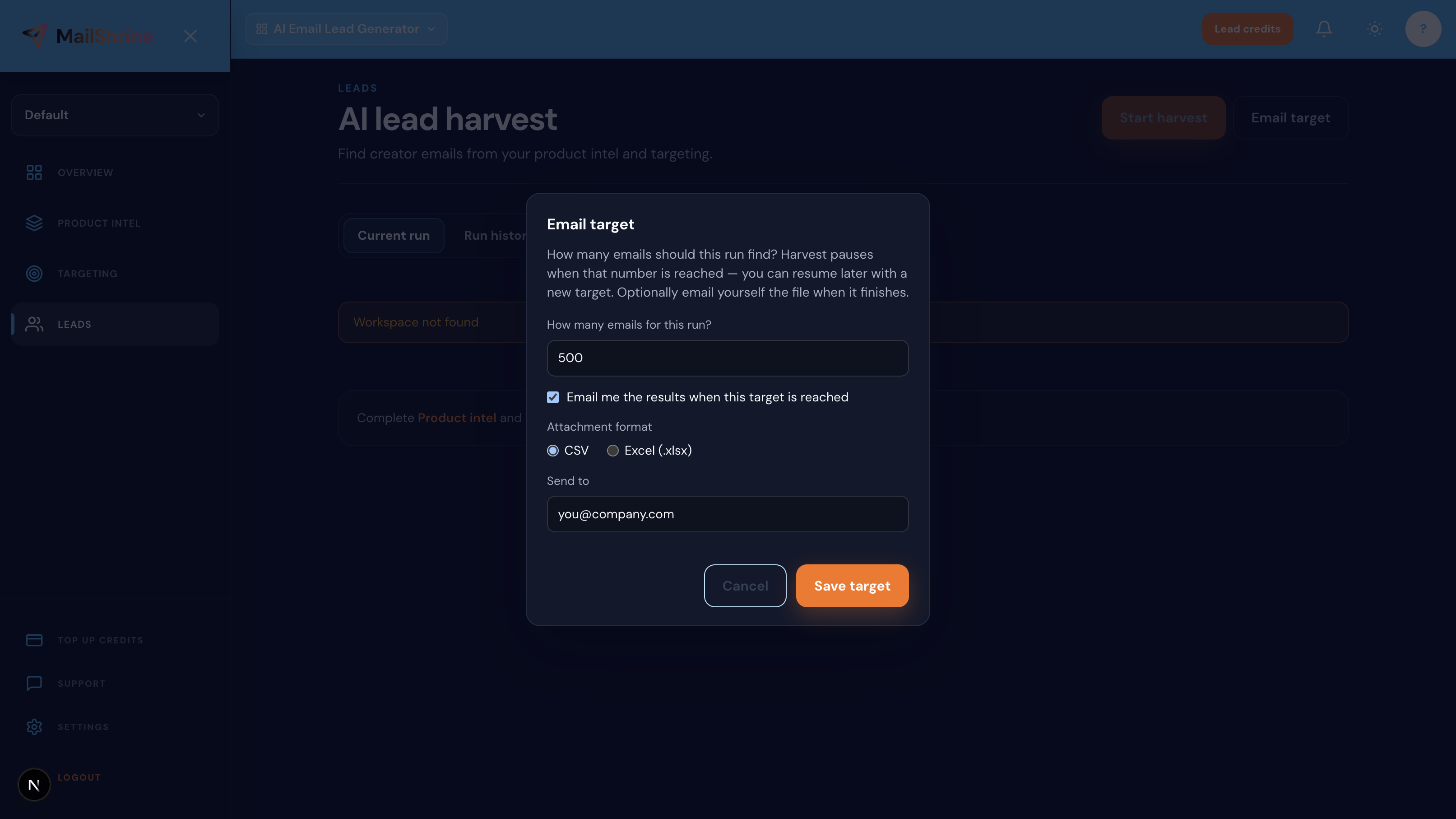
- Choose target count — Nina used 180.
- Enable Email me when target is reached.
- Pick Excel for easy filtering by agent/source column.
- Start harvest — 25 AI agents run in parallel.
Read: Email Target Delivery Explained.
Step 4: Verify and prioritize channels
After export:
- Spot-check top 10 — confirm About page still lists the email.
- Run Creator Fit Scorer on subs/engagement estimates.
- Tag management emails vs direct creator inboxes.
- Personalize using their latest video title in outreach.
Templates: Creator Outreach Email Templates.
Step 5: Send and track from MailShrine suite
- Sanitize list — YouTube emails still go stale.
- Import to Email Marketing or your CRM.
- Track replies by tier; refresh list monthly for new uploaders.
Export details: Export Leads: CSV, Excel & Email.
Nina’s YouTube email checklist
- WFH/ergonomics keywords (not brand-only)Completed
- Email target 180 + Excel inbox deliveryCompleted
- Top 25 channels manually verified on About tabCompleted
- Tier A templates reference latest videoCompleted
- First wave sent — tracking reply rateNot completed
Common mistakes to avoid
- Pitching the wrong email — agency vs creator; read the media kit.
- Ignoring upload recency — dormant channels waste budget.
- Subscriber count only — 2M subs in gaming ≠ desk niche fit.
- No email target — unbounded harvest burns credits.
- Copy-paste sponsorship spam — creators flag generic templates instantly.
Check your work
- Do keywords match viewer search intent for your product category?
- Is subscriber band + content type documented in intel?
- Did you verify a sample of About-page emails post-export?
- Are templates personalized beyond
{firstName}?
Frequently asked questions
Why can’t I see a YouTube creator’s email?
YouTube hides emails behind “View email address” for signed-in users and creators may omit them entirely. Follow linked websites and media kits; live prospecting discovers published business contacts on those trails.
Is it okay to email YouTube creators cold?
Yes for public business inquiry addresses with a relevant partnership offer — follow CAN-SPAM (unsubscribe, physical address) and disclose paid terms per FTC rules.
How many YouTube creators should I email for one campaign?
Start 40–80 highly fit channels for a niche product; expand if reply rate exceeds ~8–12% on Tier A. See Micro-Influencer Email List Building.
Can MailShrine find emails only from YouTube?
Live prospecting follows published web trails from your keywords — often YouTube About pages, linked sites, and cross-platform bios. It is not limited to one platform.
Next steps
- Instagram Creator Email Outreach — Reels-first creators.
- TikTok Creator Email Outreach — short-form overlap.
- How to Email Influencers at Scale — volume without spam flags.
Citations & References
- Reference: YouTube Help: Contact a creator
- Reference: FTC Endorsement Guides
Written by Sarah M., YouTube Partnerships Manager. Sarah helps hardware and SaaS brands reach setup-review channels without stale creator databases.